
Ext Type Meaning, Uses and Benefits
Ext Type is a technical term used when a system needs to handle special data that normal data types cannot describe well. It is most commonly linked with MessagePack, where it means Extension Type, and with NFC, where it can mean External Type. Both ideas allow developers to add custom information without changing the main standard. This makes data storage and communication more flexible while keeping the original system organized.
What Does Extension Type Mean?
In MessagePack, an Extension Type allows developers to create custom data formats. MessagePack already supports common values such as strings, numbers, arrays, maps, Boolean values, and binary data. However, modern applications often need to store more complex information.
For example, an application may need to save a UUID, date, geographic coordinate, color value, scientific measurement, or custom business ID. Instead of turning these objects into ordinary text, developers can give them a special identifier and store their actual information as binary data.
How Ext Type Works in MessagePack
An Ext Type value normally contains two main parts: a type code and a binary payload. The code tells the receiving software what kind of custom object is being transferred. The payload contains the actual data that belongs to that object.
For example, a developer could decide that code 1 represents a customer ID, code 2 represents a location, and code 3 represents a custom date format. When another application receives the information, it reads the code first and then uses the correct method to decode the attached binary data.
Main Formats and Type Codes
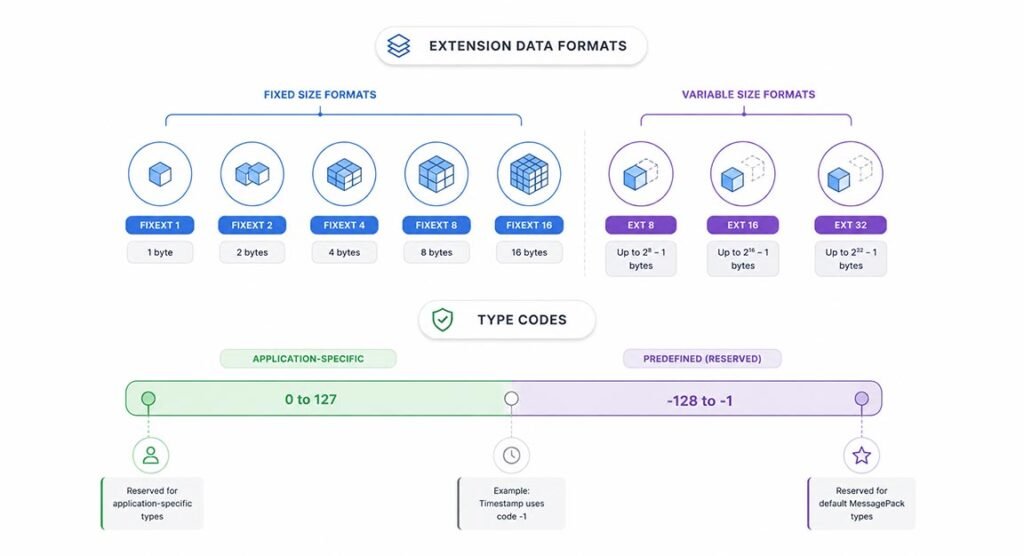
The official MessagePack specification provides several formats for extension data. These include fixext 1, fixext 2, fixext 4, fixext 8, and fixext 16. They are designed for fixed amounts of extension data. For larger or changing data sizes, MessagePack also provides ext 8, ext 16, and ext 32.
MessagePack uses an 8-bit signed integer as the extension type identifier. Values from 0 to 127 can be used for application-specific types. Negative values are reserved for types defined by the MessagePack standard itself. One important example is Timestamp, which uses the reserved code -1.
Common Uses in Programming
Developers often use custom extension data when normal data types would remove important meaning. A UUID, for example, could be stored as a string. However, the receiving application would only know that it received text unless extra rules were added.
With Ext Type, the application can clearly identify that the bytes represent a special object. This can be useful in APIs, databases, caching systems, game servers, IoT devices, microservices, real-time platforms, and distributed software where information regularly moves between different systems.
Another common use is custom business data. A company might have a special product code containing region, category, and serial information. Instead of sending several separate fields each time, developers can create one agreed custom representation that different company systems can understand.
Benefits of Using Extension Types
One major benefit is flexibility. Developers are not limited to the original data types provided by a serialization format. They can support application-specific objects while still using the same MessagePack structure.
Another benefit is compact storage. Binary representations can sometimes require less space than long text structures. This can matter when software sends thousands or millions of records across networks. Smaller data may reduce bandwidth needs and improve communication efficiency.
Extension types can also preserve meaning. If a normal binary field contains eight bytes, the receiving program may not know what they represent. Adding a type identifier gives those bytes a clear purpose, making data easier to process correctly.
Extension Type vs Standard Data Types
Standard data types are best for common information. A string stores text, an integer stores whole numbers, an array stores an ordered group of values, and a map stores key-value pairs. These types are easy for most software to understand.
A custom extension should be used when those standard types cannot represent an object clearly or efficiently. Developers should not create a special type for every value. Using normal types whenever possible usually makes data easier to share with other programs.
Extension data is also different from normal binary data. A binary field simply contains bytes. An extension field contains bytes plus a code that explains the kind of information those bytes represent.
Ext Type in NFC and External Records
The term also appears in NFC technology, although its meaning is different. In NFC, it can refer to an External Type used in an NDEF record. NDEF means NFC Data Exchange Format, a standard used to organize information stored on or transferred through NFC devices.
An NFC External Type lets developers define application-specific records. Its name normally contains a domain and a custom type, such as example.com:product. Domain-based naming helps prevent two organizations from accidentally creating the same identifier.
Android supports NFC External Type records through its NFC APIs. Developers may use them for product information, smart equipment, membership systems, event access, business tools, or other applications where an NFC tag must carry custom data.
Limitations and Compatibility Issues
Custom types also create challenges. The biggest issue is compatibility. A receiving program may recognize MessagePack but still have no idea what a custom code means. Developers therefore need clear documentation explaining each code and the structure of its data.
Version changes can create another problem. Imagine that an application changes the internal format of a custom customer ID. Older software may still expect the original layout and could read the new data incorrectly.
Security is also important. Applications should validate custom binary payloads before turning them into program objects. They should check expected length, structure, allowed codes, and other limits. Unknown or damaged extension data should be rejected or handled safely.
Best Practices for Using Custom Types
Developers should create a clear list of all custom codes used by their software. Each entry should explain the purpose, expected payload structure, data length, version rules, and decoding process. This becomes especially important when several services or programming languages exchange the same information.
It is also useful to plan for unknown types. A program may reject them, store them without processing, or pass them to another service. Developers should choose this behavior before the system goes into production.
Finally, use custom extensions only when they solve a real problem. Standard types are easier to understand and maintain. A custom format is most valuable when it preserves important meaning, reduces unnecessary conversion, or supports a data object that standard formats cannot represent properly.
When Developers Should Use Ext Type
Developers should consider Ext Type when an application regularly exchanges special objects that cannot be represented clearly with strings, numbers, maps, arrays, or ordinary binary fields. It can be especially useful when several internal services already understand the same custom structure.
It may not be the best choice when data needs to be readable by many unrelated systems. In those cases, standard formats can offer better compatibility. The right choice depends on data size, performance needs, software architecture, and how much control developers have over the systems sending and receiving the information.
FAQs
What is an Extension Type used for?
It is used to represent custom application data that normal data types cannot describe clearly. Developers can attach a special code to binary information so receiving software knows how to interpret it.
Is Extension Type only used in MessagePack?
No. Similar terms appear in other technologies. MessagePack uses Extension Types for custom serialized data, while NFC uses External Types for application-specific NDEF records.
What is a MessagePack type code?
A type code is a small number that identifies the meaning of custom extension data. Application developers can generally use codes from 0 to 127 for their own custom types.
What is the MessagePack Timestamp type?
Timestamp is a predefined MessagePack extension used to represent time. It uses the reserved type code -1 and supports different storage formats depending on the required time range and precision.
Is an extension type the same as a file extension?
No. A file extension such as helps identify a file format. An extension type in MessagePack describes custom data stored inside serialized information.