
Setmore Review: Features, Pricing and Benefits
Setmore is an online appointment scheduling tool made for service businesses, freelancers, and growing teams. It allows customers to book appointments online without calling or sending messages. Businesses can manage calendars, services, employees, payments, reminders, and customer details from one place. Its free plan makes it attractive for small businesses, while paid features add stronger scheduling and automation tools.
What Is Setmore and How Does It Work?
Setmore Review gives a business its own online Booking Page where customers can see services, prices, available times, team members, and other useful details. Customers can open this page at any time and choose an available appointment. The booking is then added automatically to the business calendar. This reduces manual work and gives customers more freedom to choose a suitable time.
A business can share its Booking Page through a website, email, social media, QR code, or marketing material. It can also add a booking button to platforms such as Facebook, Instagram, and Google Business Profile. This makes the system useful for companies that receive customers from several online channels.
Online Appointment Scheduling Features
The platform provides an all-in-one calendar for managing appointments, group classes, staff schedules, and customer bookings. Business owners can add appointments manually, change booking times, cancel sessions, or block periods when they are unavailable. Customers only see appointment times that are open, helping businesses reduce scheduling conflicts.
Recurring appointments are available for businesses with regular customers. A booking can repeat daily, weekly, monthly, annually, every working day, or on a custom schedule. This feature is useful for tutors, coaches, personal trainers, consultants, and other professionals who meet customers regularly.
Booking Page and Customer Experience
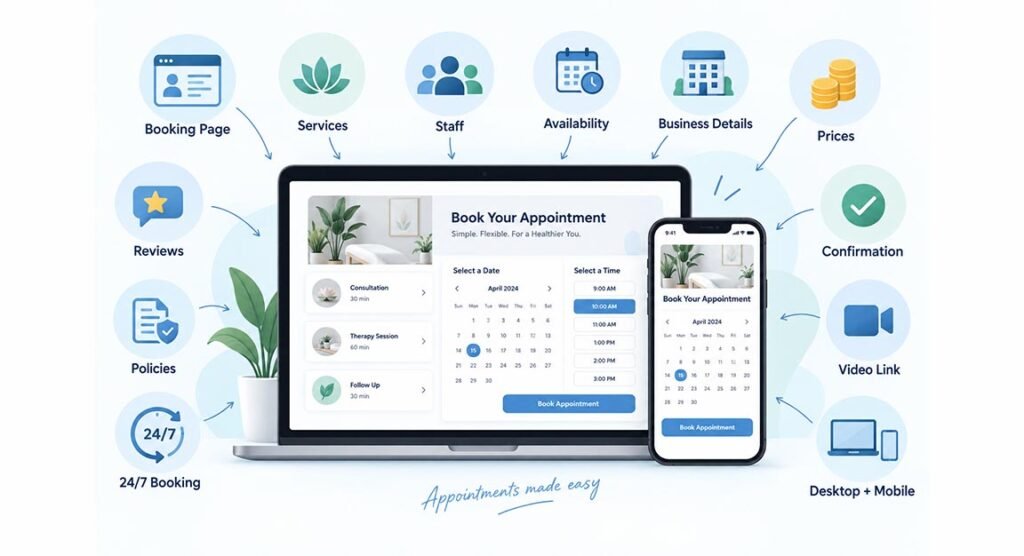
Every business can create a personalized Booking Page. It can show services, staff availability, business details, prices, reviews, and branding. Businesses can also add booking policies that explain rules about cancellations, deposits, late arrivals, or other important conditions. The page works on desktop and mobile devices.
Customers can book appointments 24 hours a day, seven days a week. They do not need to wait for business opening hours. After booking, they can receive confirmation messages with appointment information. For virtual services, a video meeting link can also be included when a supported integration is active.
Payments, Reminders and Video Meetings
Businesses can accept online payments through Stripe, Square, PayPal, and supported payment services. They may request the full price or only part of the payment before confirming a booking. Requiring a deposit can help increase customer commitment and may reduce missed appointments.
Automatic notifications are another useful feature. Free accounts include email reminders and confirmations, while Pro provides additional options such as SMS reminders and more customizable notifications. The system can notify customers when bookings are created, moved, or cancelled.
Virtual businesses can also connect Google Meet or Zoom. This is helpful for online coaching, tutoring, consultations, sales meetings, and remote professional services. A meeting link can be connected with the appointment so customers know where to join.
Calendar Sync and Business Integrations
Users who already work with other calendars can connect them to the scheduling system. Pro accounts support two-way Google Calendar and Outlook calendar synchronization. For Google Calendar, new appointments can be exported while eligible Google events are imported, helping reduce double bookings.
There are also more than 40 integrations covering social media, websites, marketing, payments, and business tools. Examples include Facebook, Instagram, WordPress, Wix, Shopify, Squarespace, Slack, Zapier, Mailchimp, Google Tag Manager, Zoom, Stripe, Square, and PayPal.
Setmore Pricing: Free vs Pro
The Free plan costs $0 per user per month and currently supports up to four users. It includes unlimited appointments, online payments, a Booking Page, email reminders, email confirmations, mobile apps, integrations, and team collaboration tools. This makes the free version useful for freelancers and small teams.
The web and desktop Pro plan costs $12 per user per month with monthly billing or $5 per user per month with annual billing. Pro adds features such as SMS reminders, recurring appointments, two-way calendar sync, Google Reviews, removal of platform branding, customer blocking, custom notifications, and priority support.
Main Benefits for Small Businesses
One major benefit is saving time. Customers can select their own appointment slots while the business focuses on its normal work. Automatic confirmations and reminders can also reduce the need to contact every customer manually before an appointment.
Another benefit is having several tools inside one system. Scheduling, payments, staff calendars, reviews, video meetings, customer details, and online booking can work together. The free level also allows a new business to start accepting online appointments without an immediate monthly software cost.
Pros and Cons
The main advantages include a free plan, 24/7 online booking, mobile apps, payment collection, staff scheduling, group classes, recurring bookings, video meetings, and many integrations. The Booking Page can also help small companies create a professional online booking experience without building a complex system themselves.
However, some advanced functions require Pro. SMS reminders, deeper calendar synchronization, and several customization features are not part of the basic free experience. Businesses with highly complex workflows, detailed enterprise reporting, or advanced CRM requirements may also need a more specialized platform.
Who Should Use This Booking Platform?
This service is suitable for salons, barbers, tutors, consultants, photographers, coaches, personal trainers, wellness professionals, repair businesses, freelancers, and small agencies. It works especially well when customers need to reserve a service, staff member, class, consultation, or fixed appointment time.
Larger teams can also benefit from staff calendars and integrations. However, businesses should first check whether their required payment service, calendar system, workflow, and country are fully supported. Testing these features before moving all customer bookings can help avoid problems later.
Is Setmore Worth Using in 2026?
For small and medium service businesses, Setmore provides a useful balance between simple scheduling and more advanced business tools. The free plan is strong enough for basic appointment management, while Pro adds tools that growing companies may need. Its combination of booking pages, reminders, payments, integrations, mobile access, and calendar management makes it a practical choice.
It may not replace a full CRM or complex enterprise management system, but it does not try to. Its main purpose is making appointments easier for businesses and customers. For companies that currently manage bookings through calls, messages, or manual calendars, moving to an online scheduling system could save meaningful time.
FAQs
Is the platform completely free?
Yes, a free plan is available at $0 per user per month and supports up to four users. Some advanced features require Pro.
Can customers pay while booking?
Yes. Businesses can accept full or partial payments through supported providers such as Stripe, Square, and PayPal.
Can I use it for online meetings?
Yes. Video appointments can be connected with services such as Google Meet and Zoom.
Does it work with Google Calendar?
Yes. Pro supports two-way Google Calendar synchronization, which can help businesses manage availability and reduce scheduling conflicts.
Is it suitable for small businesses?
Yes. Freelancers and small service businesses can benefit from its free booking page, calendar, payment options, customer reminders, and mobile tools.