What Is Skywork AI and How Does It Work?
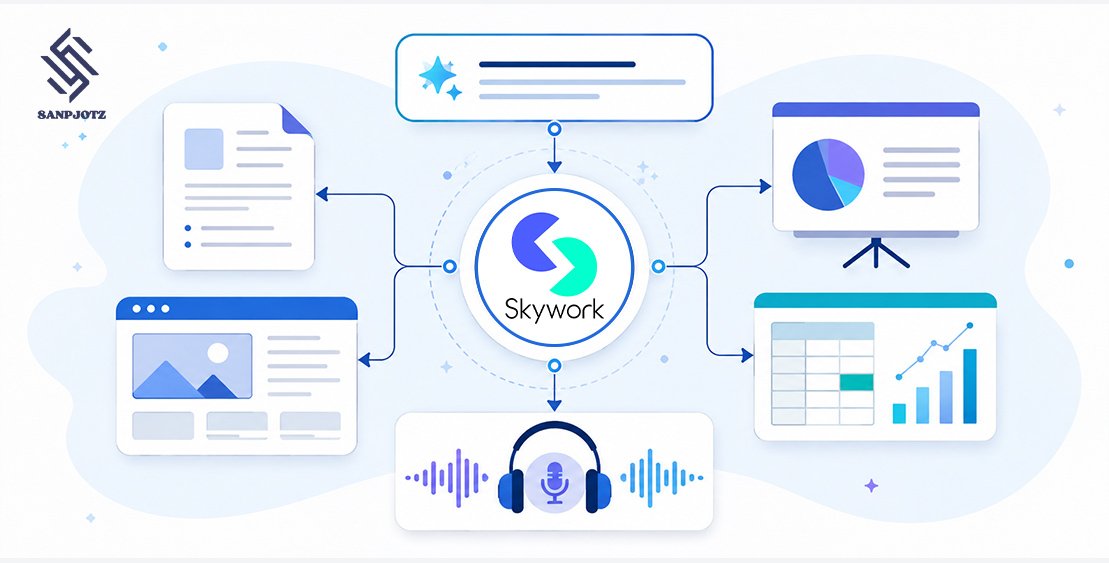
Skywork AI is a research and productivity platform that converts prompts, uploaded files, and online sources into reports, presentations, spreadsheets, webpages, and podcasts. Unlike a standard chatbot that mainly returns text, Skywork uses specialized agents to research information, organize evidence, create a finished asset, and attach citations.
Its main value is workflow efficiency. A user can research a topic, prepare a report, analyze data, and build a presentation without moving the project through several disconnected tools. Human review remains essential, especially when the output includes statistics, financial projections, or sensitive claims.
What Is Skywork AI?
Skywork AI is operated by Singapore-based SKYWORK AI PTE. LTD. and is associated with technology company Kunlun Tech. Its Super Agents workspace launched internationally in May 2025. Despite being called “Google Skywork AI” by some websites, Skywork is not owned or operated by Google.
The platform combines deep web research with AI-assisted content production. Instead of stopping at an answer, it tries to produce the asset a user actually needs. For example, a market-research request can become a cited report, a comparison spreadsheet, and an editable presentation.
Skywork has also expanded beyond its original Super Agents. General Mode and SkyClaw introduce web browsing, code execution, reusable skills, memory, scheduled tasks, and integrations with external messaging services.
How Does Skywork AI Work?
A project begins with a prompt or source material. Users can enter instructions, upload documents and spreadsheets, or provide URLs. Skywork analyzes the request, searches for relevant information, processes the material, and generates an output in the selected format.
When a request is unclear, General Mode may display a clarification card. This allows the system to ask whether a report should focus on a particular country, audience, period, or business objective. Answering those questions usually produces a more useful result than submitting a broad prompt.
For data tasks, Skywork can use code execution to calculate values and produce charts. This is generally more dependable than asking a language model to calculate everything through text prediction. However, users should still inspect formulas, units, assumptions, and source data.
What Can You Create With Skywork AI?
Skywork can generate research reports, white papers, content briefs, scripts, proposals, slide decks, financial projections, data summaries, charts, webpages, and narrated audio. Export options may include DOCX, PDF, PPTX, XLSX, CSV, and HTML, depending on the workspace and membership.
Consider a consultant researching the solar-energy market. Skywork could collect recent market figures, compare installation costs, organize the findings in a spreadsheet, and turn the main conclusions into a client presentation. All three assets can be created from the same research rather than assembled separately.
This connected workflow is useful, but it also carries a risk. If the original research contains an incorrect statistic, the same mistake may appear in every resulting asset. Users should verify the evidence before converting one output into several formats.
How Skywork DeepResearch Finds and Cites Sources
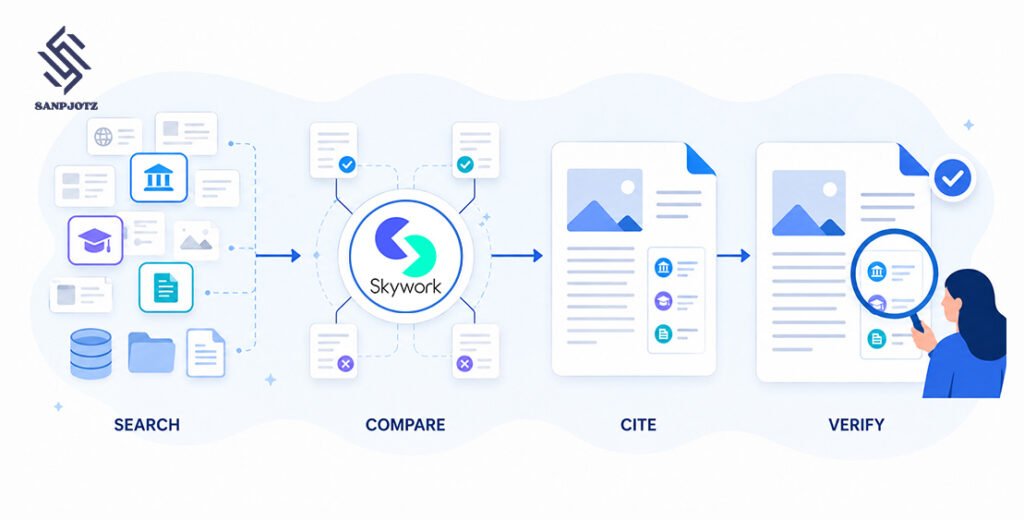
Skywork’s DeepResearch system searches online sources, selects relevant information, compares findings, and adds citations to generated content. The company says its technology can examine hundreds of webpages during a task. Some of its marketing materials mention as many as 600 sources and describe the research process as considerably deeper than ordinary AI search.
Skywork has also reported an 82.42% score on the GAIA benchmark, which evaluates how well AI assistants solve multi-step problems involving reasoning, research, and external tools. This is a vendor-reported result rather than a guarantee that every Skywork response will be 82.42% accurate.
The useful feature is not the number of pages searched but the ability to inspect the supporting references. Readers can open a citation and determine whether it genuinely supports the surrounding statement. That makes errors easier to find than in AI content with no visible sources.
More sources do not necessarily mean better research. Five official reports may be more valuable than hundreds of low-quality summaries. For important work, users should instruct Skywork to prioritize government records, academic papers, company filings, original datasets, and official documentation.
Skywork AI Super Agents and Their Uses
Skywork organizes its core creation tools into specialized agents. Each agent is optimized for a particular type of deliverable.
| Agent | Main purpose | Practical use |
| Documents | Creates structured written content | Reports, briefs and proposals |
| Slides | Builds editable presentations | Pitch decks and executive briefings |
| Sheets | Analyzes structured data | Comparisons, projections and charts |
| Webpages | Produces shareable web pages | Landing pages and visual reports |
| Podcasts | Converts material into audio | Narration, summaries and discussions |
The Documents and Slides agents are especially useful when research must be presented to clients or decision-makers. The Sheets Agent can identify patterns and build formulas, but users should not treat it as an autonomous accountant. Financial models still require careful auditing.
The Webpages Agent can create a useful prototype, but “production-ready” is too strong a description for an untested AI-generated page. Mobile responsiveness, accessibility, security, forms, links, and legal notices need manual inspection. Podcast output also requires review for pronunciation, figures, and contextual errors.
General Mode handles tasks that do not fit neatly into one of these categories. SkyClaw extends that approach with scheduled work, persistent memory, cloud execution, and reusable skills.
How to Use Skywork AI Step by Step
Start by choosing the desired output. If the final requirement is a boardroom presentation, begin with the Slides Agent rather than requesting a general explanation. Upload reliable internal documents, approved statistics, brand guidelines, or spreadsheets that should guide the project.
Write a detailed prompt that defines the audience, objective, location, research period, preferred sources, structure, and output format. A useful request might be: “Create a ten-slide briefing on European data-centre energy demand for investors. Use sources published since 2025, separate observed data from forecasts, and cite every major statistic.”
Review the research before generating more assets. Open important citations, verify calculations, and remove claims that lack support. This checkpoint prevents an error from spreading into a report, spreadsheet, presentation, and podcast.
Use precise revision instructions instead of asking Skywork to “improve” the result. Tell it to replace weak sources, shorten crowded slides, standardize currencies, explain forecast assumptions, or distinguish facts from commentary. Specific feedback tends to improve quality while reducing unnecessary credit consumption.
Skywork AI Pricing, Credits and Free Access
Skywork uses a credit-based membership system. Complex research, image generation, multimedia production, and long agent runs may consume different credit amounts. Two projects of similar length can therefore have very different usage costs.
Older Skywork pricing pages and reviews commonly mention monthly access around $19.99, quarterly billing around $39.99, and annual access near $149.99. Current official help documentation refers instead to Free, Basic, Plus, and Ultra memberships, suggesting that its pricing structure has changed.
Users should confirm the current price, included credits, renewal rules, and feature restrictions on the checkout page. It is also worth checking whether unused credits expire and whether a free trial automatically becomes a paid subscription.
A meaningful free-tier test should include a realistic research task, citations, a chart, and an export. Generating one short article will not reveal how well the platform handles a full professional workflow.
Skywork AI Accuracy, Privacy and Data Safety
Skywork can produce accurate, well-organized research, but polished formatting should not be mistaken for verified truth. Typical problems include outdated sources, citations that support only part of a claim, inconsistent datasets, and forecasts presented as facts.
According to Skywork’s privacy policy, the platform collects prompts and uploaded content to provide its services. The company states that it does not use uploaded sources, queries, or other input data for model training. It also describes encryption at rest and protection for data transferred over public networks.
Service providers, affiliates, or third parties may still process information, and it may cross jurisdictions. Users should avoid uploading confidential contracts, health information, customer records, passwords, or unreleased financial data unless their organization has reviewed the relevant agreement.
Commercial use also needs clarification. Some promotional material mentions commercial rights, while publicly accessible general terms have included personal, non-commercial-use language. Businesses should check the conditions attached to their specific plan instead of relying on third-party reviews.
Skywork AI Pros and Limitations
Skywork’s main strength is its ability to move from research to several professional formats inside one workspace. Citation links, file uploads, data tools, editable exports, and personal knowledge bases can remove hours of repetitive work.
Its limitations become clearer on complex projects. Credits may be consumed quickly, visual designs can feel generic, and spreadsheets may contain incorrect assumptions or formulas. Citations improve transparency, but they do not eliminate hallucinations or weak interpretation.
A less obvious limitation is error multiplication. An unsupported claim in the original report may be repeated automatically across every connected output. The safest workflow is to verify research first and generate secondary assets afterward.
Skywork should therefore be treated as a supervised production system, not an independent authority. It can accelerate research and formatting, but the user remains responsible for judgment, accuracy, and final quality.
Who Should Use Skywork AI?
Skywork AI is most suitable for consultants, researchers, analysts, marketers, educators, students, and content teams that frequently turn research into formatted deliverables. It is especially useful when the same project requires a report, spreadsheet, presentation, and audio summary.
People who only need casual answers may find a conventional chatbot simpler. Skywork’s value becomes more noticeable when a task involves multiple sources, structured data, citations, and several output formats.
The platform should not be used to publish unreviewed medical, legal, financial, or reputational claims. It also cannot replace specialist data auditing, investigative reporting, original creative direction, or professional web development. Used with human oversight, however, it can reduce a substantial amount of research and production work.
FAQs
Is Skywork AI free?
Skywork provides limited free access, but credits and features may change. Check the current account page for exact limits.
Is Skywork AI better than ChatGPT?
Skywork is more focused on research-to-deliverable workflows. ChatGPT is broader and may be more suitable for conversation, reasoning, writing, and coding.
Is Skywork AI a Google product?
No. Skywork AI is operated by SKYWORK AI PTE. LTD., not Google.
Can Skywork AI be trusted for research?
It can provide useful research and traceable citations, but important sources and calculations must still be checked manually.