
Cloud Migration Tools: Features and Benefits
Moving business data, applications, and systems to the cloud can be difficult without the right support. Cloud Migration Tools help companies plan, transfer, test, and manage their digital resources during this process. These solutions can reduce manual work, control downtime, and find problems before the final move. They are useful for small companies as well as large organizations that need a safer and more organized way to move to cloud platforms.
What Are Cloud Migration Tools?
It are software solutions and services that help businesses move workloads from one computing environment to another. A company may move resources from its own data center to a public cloud or between two cloud providers. The resources can include applications, databases, files, servers, virtual machines, and storage systems.
Cloud Migration Tools can support different business data stages of this process. Some tools focus only on moving data, while others provide discovery, assessment, migration planning, cost estimates, replication, testing, and monitoring. Major providers such as Amazon Web Services (AWS), Microsoft Azure, and Google Cloud offer their own solutions for different migration needs.
How Its Work
A cloud migration normally starts with discovery. The tool scans the existing IT environment and creates a list of servers, databases, applications, and other resources. It may also collect information about CPU usage, memory, storage, network activity, operating systems, and software.
After discovery, the system can assess each workload. Cloud Migration Tools may recommend suitable cloud resources and indicate whether an application is ready to move. The next steps usually include replication, testing, and cutover. During replication, information is copied to the new cloud system. Testing helps confirm that the application works correctly before users are moved to the new environment.
Key Features of Cloud Migration Tools
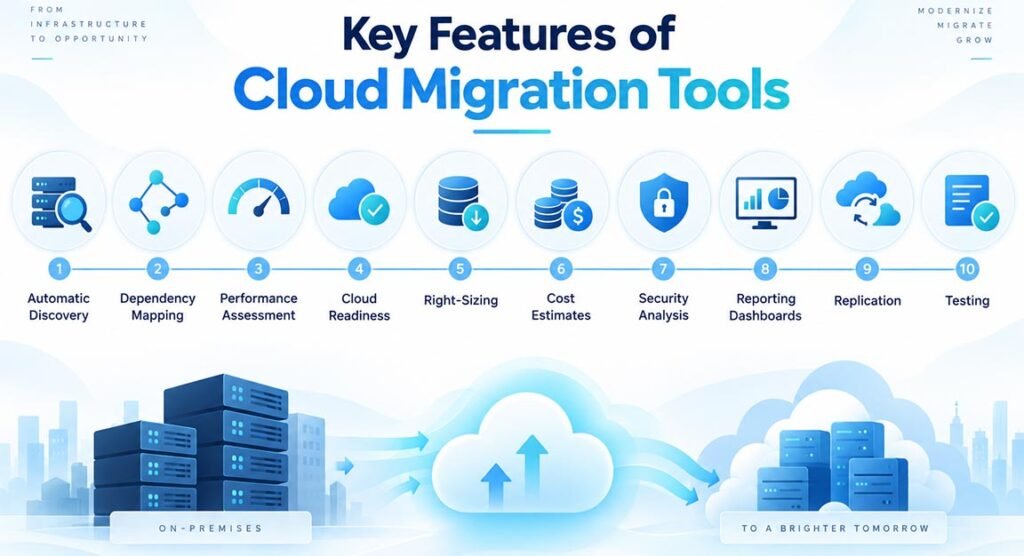
One important feature is automatic discovery. It saves companies from creating large infrastructure lists manually. Another useful feature is dependency mapping, which shows how applications, servers, and databases communicate with each other. This information helps teams avoid moving one system while leaving an important connected service behind.
Modern tools also offer performance assessment, cloud readiness checks, right-sizing, cost estimates, security analysis, and reporting dashboards. Right-sizing is especially useful because it recommends cloud resources based on real usage. Companies can avoid paying for a large virtual machine when their workload actually needs a smaller and less expensive option.
Replication is another important feature. It allows data or workloads to be copied while the original system is still running. This can reduce downtime during migration. Many platforms also provide test environments so IT teams can check performance, security, network connections, database access, and application functions before completing the final move.
Main Types of Cloud Migration Tools
There are several types of migration solutions because companies do not always move the same type of resource. It may be designed for complete servers, applications, databases, storage, or large sets of business data.
Discovery and assessment tools study the existing environment and help create a migration plan. Application migration tools move complete workloads or virtual machines. Database migration tools transfer database information and may continuously copy new changes until the final cutover.
Data migration tools mainly focus on files and storage. Companies moving very large amounts of information may also use physical transfer devices when internet transfer would take too long. Other tools focus on modernization and help businesses change older applications so they can use newer cloud services.
Benefits of Using Cloud Migration Tools
One of the biggest benefits is automation. Manually checking hundreds of servers and moving their information can take a large amount of time. Migration software can automate many repetitive steps and help technical teams focus on more important decisions.
Cloud Migration Tools can also reduce migration risk. Dependency analysis can identify systems that must move together. Testing features help teams find technical problems before production traffic reaches the new environment. Continuous replication can also keep data updated until the final switch, reducing the amount of time an application needs to remain offline.
Cost planning is another major benefit. Assessment tools can study current resource usage and estimate the possible monthly cloud cost. Businesses can use this information to prepare budgets and choose the correct server size. Better planning may help prevent unnecessary cloud spending after migration.
Popular It for AWS, Azure, and Google Cloud
AWS provides several solutions for cloud migration. AWS Application Migration Service helps companies move applications and servers to AWS. AWS Database Migration Service (DMS) focuses on databases and supports continuous replication. AWS Migration Evaluator helps businesses study existing infrastructure and prepare a financial business case.
Microsoft Azure Migrate provides a central platform for discovery, assessment, migration, and modernization. It can examine servers, databases, applications, and virtual desktop environments. Microsoft also provides services such as Azure Data Box for transferring very large amounts of data.
Google Cloud Migration Center supports infrastructure discovery, assessment, cost estimation, and migration planning. Google also provides Migrate to Virtual Machines for moving virtual machines and Database Migration Service for supported database workloads. The best option depends on the source environment, target cloud, workload type, and business requirements.
Cloud Migration Tools for Data, Apps, and Databases
Different workloads require different migration methods. A basic file transfer solution may work well for documents and backups but may not be suitable for a live business database. Database tools often need continuous data replication so new records and updates are not lost while the migration is taking place.
Applications can also require special planning. Some companies choose rehosting, often called lift and shift, where an application moves with very few changes. Others choose replatforming, where some parts are improved during migration. A business may also refactor an old application to use cloud-native technology such as containers, managed databases, or serverless services.
Understanding these differences helps businesses select the correct migration product instead of expecting one tool to handle every type of workload.
How to Choose the Right Cloud Migration Tool
Start by identifying exactly what needs to move. Check whether you are migrating servers, applications, databases, files, virtual machines, or complete business systems. Next, confirm the source environment and target cloud because some products work better with certain platforms.
Companies should also compare security, encryption, downtime requirements, automation, reporting, dependency mapping, supported operating systems, cost assessment, scalability, and technical support. The tool should fit both current requirements and future cloud plans.
Price should not be the only factor. A cheaper solution can become expensive if it creates long downtime or requires a large amount of manual work. Businesses should choose a platform that offers the right balance of cost, reliability, security, compatibility, and ease of management.
Common Challenges When Using Cloud Migration Tools
Migration software can make the process easier, but it cannot remove every challenge. Older applications may not work correctly in modern cloud environments. Large datasets may take a long time to transfer, and complicated systems may have dependencies that are difficult to identify.
Security and cost management also require attention. Incorrect permissions can create security problems, while oversized cloud resources can increase monthly bills. Businesses should test every important workload and review cloud costs after migration.
A successful cloud move depends on both good technology and good planning. Companies that understand their infrastructure, choose suitable tools, test carefully, and monitor the new environment have a better chance of gaining the long-term benefits of cloud computing.
FAQs
What are cloud migration tools?
They are software and services that help businesses move applications, servers, databases, files, and other workloads from data centers or other cloud platforms to a new cloud environment.
What are the main benefits of It?
The main benefits include less manual work, reduced downtime, better cost planning, easier testing, dependency discovery, improved migration control, and lower technical risk.
Which cloud migration tool is best?
There is no single best solution. AWS, Microsoft Azure, and Google Cloud provide different migration services. The right choice depends on your workload, target platform, budget, and technical needs.
Can cloud migration tools reduce downtime?
Yes. Many solutions use continuous replication, which keeps copying changes while the original system remains active. This can make the final migration window much shorter.
Are Its only for large companies?
No. Both small and large organizations can use them. Small businesses may need simple data or application migration, while large companies often need discovery, assessment, dependency mapping, and migration-wave planning.