
Process Mapping Software: Top Tools and Key Features
Process Mapping Software helps businesses show how work moves from one step to another. It turns tasks, decisions, people, and systems into easy visual diagrams. These maps can help teams understand complex work, find delays, and improve daily operations. Modern tools also offer templates, teamwork features, AI support, integrations, and automation. This makes process mapping useful for small teams as well as large companies.
What Is Process Mapping Software and How Does It Work?
Process Mapping Software is a digital tool for creating visual maps of business processes. A map can show where a process starts, what actions happen, who is responsible, where decisions are made, and how the process ends. Instead of reading a long document, employees can understand the workflow by looking at connected boxes, symbols, and arrows.
Most tools have a drag-and-drop editor, so users do not need coding or design skills. They can add tasks, decision points, documents, and other elements to a canvas. Some platforms also provide ready-made templates for sales, HR, customer service, finance, IT, and project management processes.
Key Features to Look for in Process Mapping Software
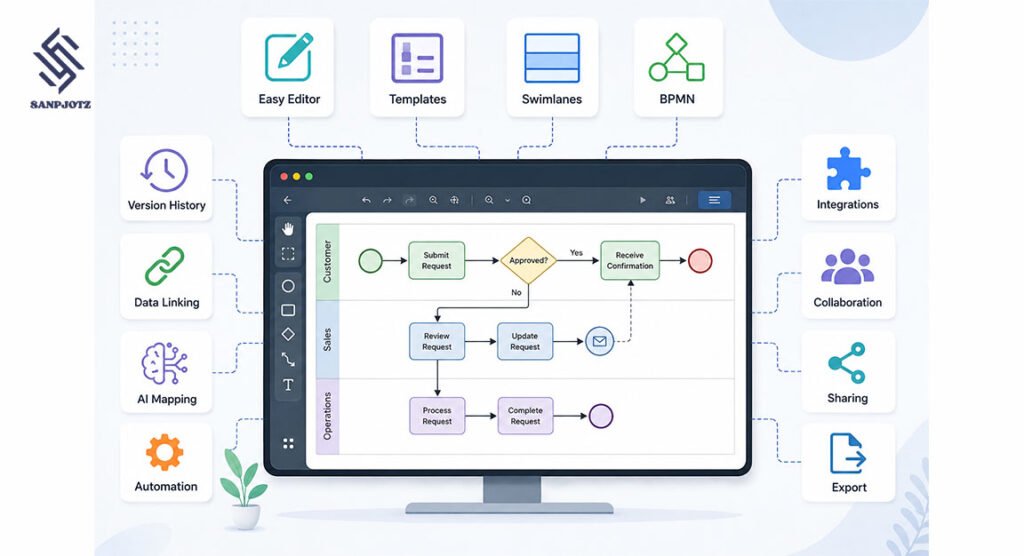
Good Process Mapping Software should make it easy to create, change, and share diagrams. A simple editor is important because people from different departments may need to use the system. Useful tools normally include flowchart shapes, swimlanes, templates, connectors, comments, sharing controls, and export options.
More advanced platforms may offer BPMN support, version history, data linking, AI diagram creation, workflow automation, and third-party integrations. Real-time collaboration is also valuable for remote teams. Several people can work on the same map, leave feedback, and improve the process without sending different file versions by email.
Best Process Mapping Software Tools for Different Needs
There are several popular tools, but they serve different types of users. Lucidchart is strong for professional diagrams, detailed flowcharts, data linking, and team collaboration. Miro is useful for remote teamwork, workshops, brainstorming, flowcharts, and visual planning. It gives teams a large shared workspace where ideas and process steps can be organized together.
Microsoft Visio is a strong choice for companies already using Microsoft products. diagrams.net, also called draw.io, is useful for simple and low-cost diagramming. Whimsical focuses on fast visual work, while FigJam works well for product and design teams. Process Street goes further by helping businesses run repeatable workflows instead of only drawing them.
How Process Mapping Software Helps Improve Workflows
A process map makes hidden problems easier to notice. For example, a business may discover that one document needs approval from too many people. Another process may include the same task twice. A map can also show where information is missing or where work often waits for another department.
This makes Process Mapping Software useful for finding bottlenecks, repeated work, unnecessary steps, unclear responsibilities, and slow handoffs. After finding these problems, a company can create a better future process. Teams often compare an “as-is” map, which shows the current workflow, with a “to-be” map, which shows the improved workflow.
Process Mapping Software for Teams and Collaboration
Process mapping is often more effective when the people who perform the work help create the map. Managers may understand the main process, but employees often know the small steps, exceptions, and real problems that happen every day. Team collaboration can therefore make a process map more accurate.
Cloud tools such as Miro and Lucidchart allow users to edit diagrams together, add comments, and review changes. This is helpful for remote or international teams. Clear maps can also support employee training because new workers can quickly see how tasks move between people and departments.
BPMN, Flowcharts, and Other Process Mapping Types
A flowchart is one of the simplest types of process maps. It uses shapes and arrows to show a sequence of actions. A swimlane diagram adds separate lanes for people, teams, or departments. This makes it easier to understand who owns each part of a process.
Large organizations may also use BPMN, which means Business Process Model and Notation. BPMN uses standard symbols for detailed business processes. Other useful formats include value stream maps, SIPOC diagrams, customer journey maps, and data-flow diagrams. The right type depends on how detailed the process needs to be.
AI, Automation, and Integrations in Process Mapping Software
Modern Process Mapping Software is becoming more intelligent. Some platforms can use AI to create a first process diagram from a written description. A user may explain a hiring, sales, or customer support process, and the system can build a basic visual map. The team can then review and improve it.
Automation can make process maps even more useful. A mapped process may connect with tools such as Slack, Google Workspace, Microsoft 365, Jira, Asana, CRM systems, or automation platforms. A company may automatically send reminders, create tasks, request approvals, or update records when certain process steps happen.
Free vs Paid Process Mapping Software Options
Free tools can be enough for simple diagrams, personal projects, students, and small teams. They may include basic shapes, templates, sharing, and a limited number of files or boards. diagrams.net is especially popular for users who want straightforward diagram creation without a large software package.
Paid plans usually provide more advanced features. These may include larger template libraries, AI tools, more users, stronger permissions, data connections, integrations, version history, admin controls, and enterprise security. Companies should compare features instead of choosing only by price because a cheap tool may become difficult to manage as the team grows.
How to Choose the Right Process Mapping Software
Start by deciding what you need to map. A small business creating simple employee procedures may only need basic flowcharts. A large company may require BPMN, permissions, advanced collaboration, integrations, security controls, and workflow automation. The number of users and the complexity of the processes should guide the decision.
It is also useful to test the software with a real process before paying for a long plan. Check whether employees can understand the interface, build diagrams quickly, share maps easily, and update them without problems. The best platform is one that fits the way your team already works.
Common Mistakes to Avoid When Mapping Business Processes
One common mistake is adding too much detail. A map that includes every small action can become difficult to read. Start with the main steps and add deeper information only where it is needed. Another mistake is creating the map without asking employees who actually perform the process.
Businesses should also keep maps updated. A process can change when a company introduces new software, hires new staff, changes policies, or removes old tasks. An outdated diagram may create more confusion instead of helping employees. Regular reviews keep process documents useful and accurate.
FAQs
What is process mapping used for?
Process mapping is used to visually show how work is completed. It helps teams understand steps, responsibilities, decisions, delays, and areas that may need improvement.
Which tool is best for process mapping?
The best tool depends on your needs. Lucidchart works well for professional diagrams, Miro is strong for teamwork, and Visio fits many Microsoft-based companies.
Can I create process maps for free?
Yes. Some platforms provide free plans, and diagrams.net is a popular free option for creating flowcharts and other simple diagrams.
What is the difference between BPMN and a flowchart?
A flowchart is simple and flexible. BPMN follows standard rules and symbols, making it more suitable for complex business processes.
Can AI create process maps?
Yes. Some modern tools can turn written instructions into a basic process diagram. However, employees should review the map to make sure every step is correct.