Perchance AI Video Generator: Features, Uses and Limits
The Perchance AI Video Generator is becoming interesting for people who want to test AI-based video creation without using complex editing software. Perchance is mainly known as a platform where users can build and share different generators for text, images, stories, characters, and creative projects. Video-related generators also appear on the platform, but they do not all work in the same way. This makes Perchance useful for experiments, but users should understand its features and limits before depending on it.
What Is Perchance AI Video Generator?
The Perchance AI Video Generator is better understood as a group of community-created video tools rather than one official video model. Perchance.org allows users to create, customize, and share generators. Some creators build tools that focus on video prompts, animation, or text-to-video tasks.
This structure is different from services such as Runway, Kling, Pika, or Google Veo, which provide their own clear video-generation systems. On Perchance, the quality and functions of a video page can depend on the person who created it and the external technology connected to it.
How Perchance AI Video Generator Works
The Perchance AI Video Generator usually starts with a simple text prompt. A user writes a description of the scene they want to see. The generator then processes that request through the available AI system or connected service. If the tool supports video generation, it can return a short moving clip based on the prompt.
For better results, users should explain the subject, action, setting, camera view, lighting, and style. For example, “A red train moving through snowy mountains, wide camera shot, soft morning light, realistic style” gives the system much more information than simply writing “train in snow.”
Main Features Available in Perchance Video Tools
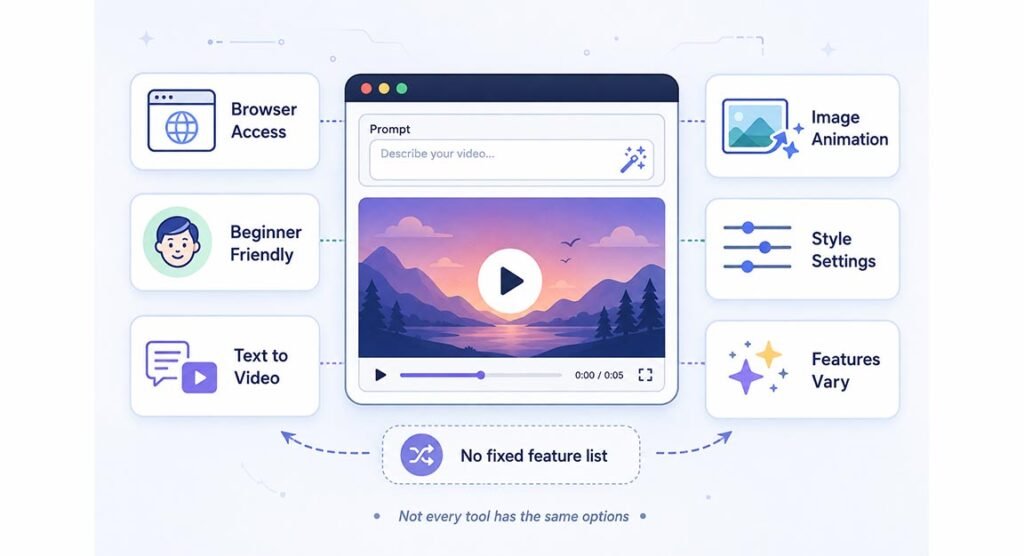
One of the main advantages of Perchance is easy access. Many public generators can be opened directly in a browser, and users can often test them without creating an account. This makes the platform suitable for beginners who want to understand how AI prompts and video generation work.
However, there is no fixed feature list. Some pages may offer text-to-video, while others may include image animation, style settings, or additional controls. Users should not assume that every page supports HD output, model selection, camera control, lip sync, audio, or long video generation.
How to Create Better Videos With Perchance
A strong prompt can improve the result. Start by describing one clear subject and one clear action. Then add details about the location and visual mood. Words such as walking, flying, turning, zooming, panning, drifting, and running can help the system understand movement.
It is also better to keep scenes simple. A prompt with many people, different actions, moving vehicles, and several camera changes can create strange results. Generating one short scene at a time is usually more reliable. These clips can later be combined in software such as CapCut, DaVinci Resolve, or Adobe Premiere Pro.
Best Uses for Perchance AI Video Generator
The Perchance AI Video Generator can be useful for people who want to test creative ideas before using paid software. Writers can visualize scenes from stories, social media creators can test short video concepts, and students can learn how text prompts influence AI-generated movement.
It may also help with mood boards, animation experiments, concept videos, story planning, and short social clips. A filmmaker, for example, could test how a rainy street scene might look before filming it. The generated result may not be final-quality footage, but it can help explain an idea quickly.
Perchance Video Limits and Common Problems
The biggest limitation is inconsistency. Since different community members can build different generators, one page may work well while another may provide poor results or stop working. Some tools may depend on outside APIs or AI services, which means availability can change without warning.
Short clip length can also be a problem. Users may see issues such as changing faces, strange hands, unstable backgrounds, unnatural walking, disappearing objects, or incorrect camera movement. These problems are common in generative video technology, especially when prompts contain complicated scenes.
Is Perchance Free to Use?
Many public Perchance generators are available without a normal paid subscription. Users can often open a page, enter a prompt, and experiment directly. An account is mainly useful for people who want to create and manage their own generators on the platform.
Still, users should be careful with claims such as “completely unlimited.” A generator may use an outside service that has its own server limits, queues, generation limits, or availability problems. A tool can be free to access while still having technical restrictions.
Privacy, Safety and Commercial Use
Users should avoid adding sensitive information to an unknown community generator. This includes passwords, private documents, confidential client files, personal information, and protected business material. A Perchance page may connect with another service, and users may not always know how that external system handles data.
Commercial use also needs careful checking. If a generator uses another AI model or outside API, that service may have separate rules for business use. Anyone planning to use AI-generated clips in advertising, paid campaigns, client projects, films, or commercial social content should check the terms of the exact tool.
Perchance vs Dedicated AI Video Platforms
Dedicated video platforms usually offer more professional controls. Services such as Runway, Kling, Pika, and other major AI video tools may provide longer clips, higher resolution, image references, video extension, advanced camera movement, stronger character control, and more reliable output.
Perchance has a different strength. It gives users an open space for experimentation and community-made generators. The Perchance AI Video Generator can therefore be useful for learning and testing ideas, while professional video platforms are often a better choice when stable quality and detailed creative control are required.
Is Perchance Worth Using?
Perchance is worth trying if your goal is learning, experimenting, or creating quick visual ideas. It can help beginners understand how prompts affect AI video without requiring advanced editing skills. Its browser-based approach and community structure also make it easy to explore different creative tools.
However, it should not be treated as a complete replacement for professional video software. The Perchance AI Video Generator is best for experiments, short concepts, and creative learning. For client work, advertising, longer videos, or projects that need consistent characters and predictable quality, a dedicated AI video platform will normally be more suitable.
FAQs
Is Perchance really an AI video generator?
Perchance is mainly a platform for community-created generators. Video-related tools exist on it, but they may use different systems and do not represent one official Perchance video model.
Can I create videos on Perchance for free?
Many public generators can be tested without payment. However, some tools may depend on outside services that have queues, limits, or other restrictions.
Does Perchance support image-to-video generation?
Some community tools may support image animation or image-to-video functions. Availability depends on the exact generator, so users should check its features before uploading an image.
Can I use Perchance videos commercially?
Commercial rights depend on the generator and any external AI service behind it. Always check the specific terms before using a generated clip in paid or business content.
Is Perchance better than Runway or Kling?
Perchance is useful for free experiments and learning. Runway and Kling are more focused on professional AI video generation and usually offer stronger controls, consistency, and production features.