Unlucid AI Review: Features, Gems, Pros and Cons
Unlucid AI is a browser-based creative platform for generating images, editing pictures, and making short AI videos. It uses a credit system called Gems instead of a normal monthly subscription. Users can also claim free Gems, try ready-made video effects, use reference images, and improve generated pictures with upscaling. The platform is mainly designed for hobby creators, social media users, and people who want fast AI content without installing complex software.
What Is the Platform and How Does It Work?
The service combines several creative tools inside one website. Users can generate an image from text, edit an uploaded picture, or turn a still image into a short video. Everything works through a web browser, so users do not need a powerful computer or a local AI model.
The normal process is simple. Choose a tool, enter a prompt or upload an image, select the available settings, and start generating. Each task uses Gems. Images usually require fewer credits than edits or videos, which makes the basic cost system easy to understand.
Image Generator and Available Styles
The image generator lets users describe a subject, scene, mood, lighting, and camera position with normal words. More detailed prompts can help the system understand what the user wants. The official guidance also supports instructions such as close-up, full-body view, selfie, overhead shot, side view, and wide-angle composition.
Unlucid AI currently offers five main image styles: Realistic, Cartoon, 3D Render, Anime, and Pencil. Realistic is the standard choice. Users can also upload an image reference to guide the new result or use Face Reference when they want similar facial features across different creations.
Image Editing, Face Reference and Upscaling
The image editing tool lets users change only part of an existing picture. AUTO and BRUSH options help select the area that should be edited. Users can remove unwanted objects, replace items, add new objects, or change clothing while trying to keep the rest of the image unchanged.
The platform also includes High Resolution Upscale, which can improve clarity and small details after generation. This can be useful when faces, hands, or textures do not look correct. Another feature is Seed control. Reusing the same seed and similar settings can help users create results with a more consistent visual direction.
Video AI and Effects AI Features
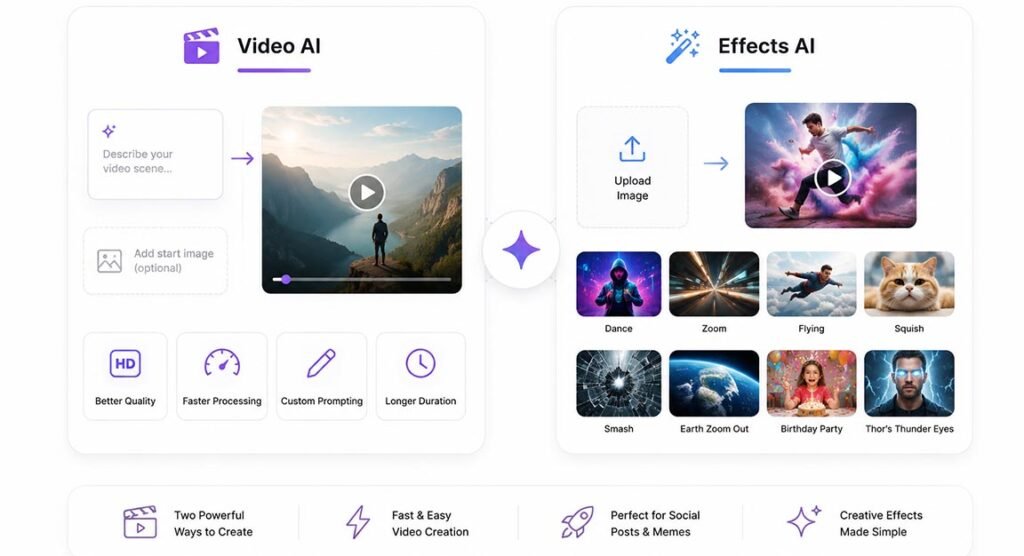
Unlucid AI provides two main ways to create video content. Video AI is the more flexible option because users can describe the type of movement or scene they want. A starting image can also be used. In September 2025, the platform announced improvements to video quality, processing speed, custom prompting, and video duration.
Effects AI is easier for beginners. Users upload an image and choose a ready-made animation instead of writing a complex prompt. Examples include Dance, Zoom, Flying, Squish, Smash, Earth Zoom Out, Birthday Party, and Thor’s Thunder Eyes. These effects work well for short social posts, memes, and experimental videos.
Gems, Free Credits and Pricing
The platform uses a credit system called Gems. Users do not have to pay for a fixed monthly membership. Instead, they can buy credits when needed. Free Gems are also available daily, although the exact number can change over time.
Current paid packages include 120 Gems for $8.99, 450 Gems for $29.99, and 1,250 Gems for $59.99. The listed output limits suggest that a basic image may cost around one Gem, an edit around two Gems, and a video around ten Gems. Paid Gem packages also advertise no watermark.
The larger packages give better value per credit. The 120-Gem option costs about 7.5 cents per Gem, while the 1,250-Gem package costs about 4.8 cents per Gem. However, users should remember that failed generations or repeated attempts can increase the real cost.
Image and Video Quality in Real Use
Image results can work well for simple portraits, characters, concepts, and stylized scenes. However, complex prompts may still create unusual hands, faces, object positions, or background details. This is common with generative image tools, so users may need to create several versions before getting a strong result.
Video tools are better suited to short clips than full professional productions. Ready-made effects are quick and simple, but they do not give the same control as advanced editing software. Users who need timelines, detailed keyframes, professional audio editing, or long projects will probably need another video editor.
Pros and Cons
Unlucid AI has several useful advantages. It works directly in a browser, does not require software installation, and combines image generation, editing, and short video tools in one place. The one-time Gem model is also helpful for people who do not want another monthly subscription. Free daily Gems make it easier to test the service before paying.
There are some limits. AI results can be inconsistent, retries can quickly use more Gems, and there is less public company information than with major AI brands. Independent user feedback is also more limited. People working with private photos or business files should read the latest privacy and usage rules before uploading sensitive material.
Safety, Privacy and Legitimacy
The service appears to be an active and functioning platform. It has working creative tools, public tutorials, paid credit packages, free usage options, and a visible history of product updates. Its domain was registered in February 2025, and new Effects AI features continued to appear during 2026.
However, public information about the team and company ownership remains limited. That does not automatically mean the service is unsafe, but users should still be careful. Always check current privacy terms before uploading confidential content. Users should also respect copyright, consent, and local laws when working with real people’s faces or personal photos.
Is It Worth Using in 2026?
For casual users, Unlucid AI can be worth testing because the free Gems make it possible to explore the tools without a large first payment. The $8.99 package also offers a low-cost starting point for people who want more generations without committing to a subscription.
The service is most useful for quick images, simple edits, creative effects, and short social videos. It may be less suitable for enterprise work, confidential projects, advanced filmmaking, or users who need highly consistent results. Testing the free option first is the best way to decide whether its output quality fits your own needs.
FAQs
What are Gems?
Gems are credits used for images, edits, and video generations. Different tools can require different numbers of credits.
Is there a free option?
Yes. The platform provides daily free Gems, although the exact amount may change.
Can I use it on mobile?
Yes. The website is designed to work on both desktop and mobile browsers.
Can it edit an existing photo?
Yes. Users can remove objects, replace items, change selected areas, and make other AI-based edits.
Is it good for professional video editing?
It is better for short AI clips and effects. Professional editors may need advanced software for timelines, audio, and detailed control.