What Is LMM? Meaning, Uses, and Examples in AI
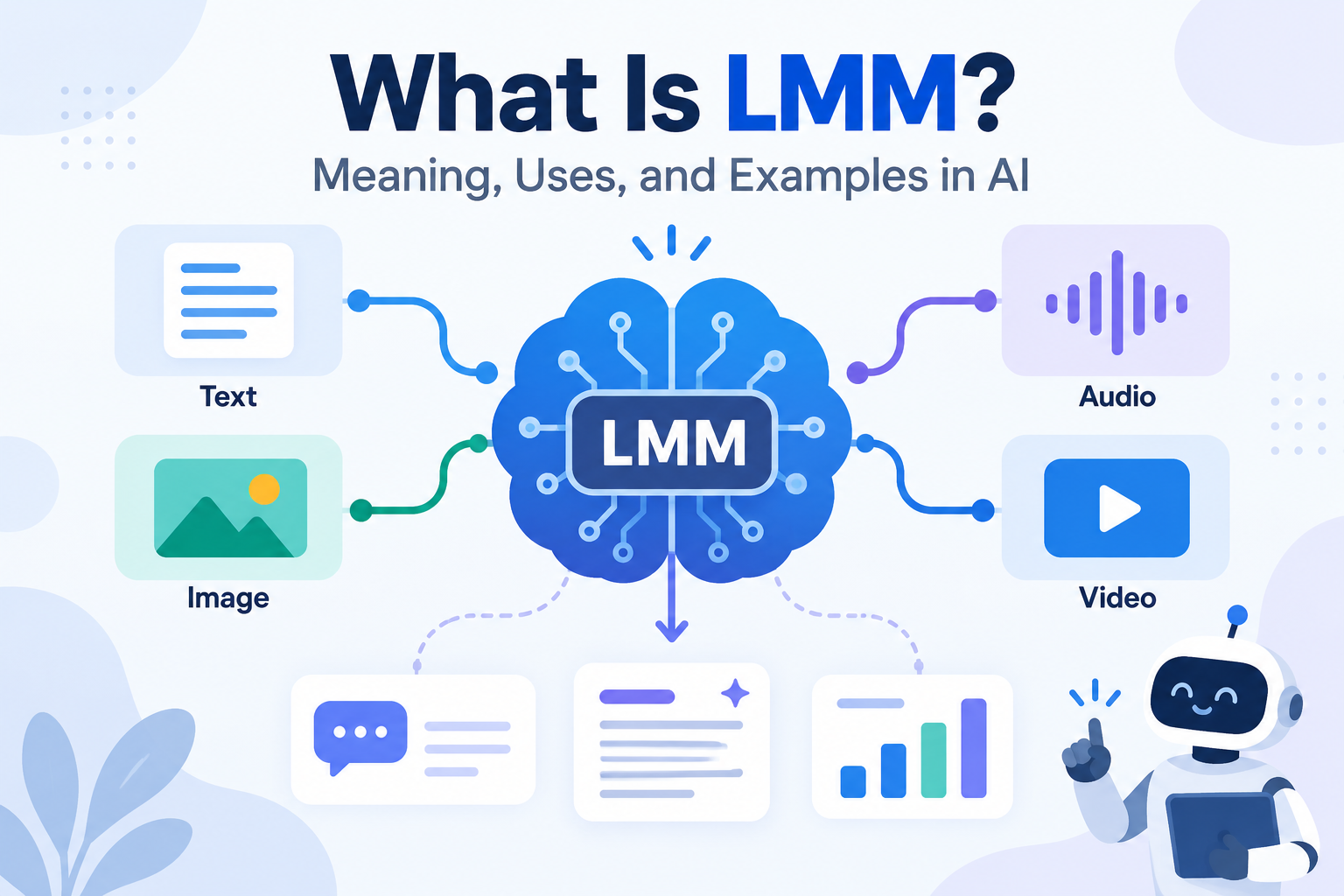
An LMM, or Large Multimodal Model, is an AI system that can understand more than one type of information, such as text, images, audio, video, and documents. Unlike a traditional text-focused language model, an LMM can connect different forms of data and use them together when answering a question.
For example, you can upload a screenshot of a software error and ask what went wrong. A text-only model needs you to describe the problem first. An LMM can inspect the screenshot, read the visible text, understand the interface, and then explain the likely issue.
This makes multimodal AI more useful for real-world tasks, where information rarely comes in one format.
What Does LMM Mean in Artificial Intelligence?
In AI, LMM usually stands for Large Multimodal Model.
The word “large” refers to the scale of the model, its training data, or both. “Multimodal” means it can process several forms of information, also called modalities.
Common modalities include text, images, audio, video, charts, screenshots, PDFs, and other documents.
You may also see the term MLLM, or Multimodal Large Language Model. The meaning is very similar, although MLLM puts more emphasis on the language model being the main reasoning system.
Another related term is VLM, or Vision-Language Model. A VLM usually focuses on text and visual information, while an LMM may support a wider range of inputs such as audio and video.
Microsoft Research, for example, describes LLaVA as a large multimodal model for visual and language understanding.
How Large Multimodal Models Work
An LMM does not process text, images, and audio in exactly the same way. Each type of information first needs to be converted into a mathematical form the model can understand.
Text is normally broken into tokens. Images may pass through a vision encoder that identifies objects, shapes, colors, and visual patterns. Audio can be processed by a separate system that extracts speech and sound features.
The next step is connecting these different representations.
Many multimodal systems use a connector or projection layer between the image or audio encoder and the language model. This helps turn visual or audio features into a format the language model can work with.
This is important because an image encoder and a language model are not naturally speaking the same mathematical “language.”
Once the information is aligned, the model can connect a user’s question with the relevant part of an image, document, or recording.
For example, if you upload a chart and ask, “Why did sales fall in March?”, the model needs to read the chart, understand the labels, identify the March value, and then reason about the information you provided.
What Types of Data Can an LMM Understand?
The exact answer depends on the model. Being called multimodal does not mean a system supports every possible data type.
The most common combination is text and images. This allows tasks such as screenshot analysis, image description, visual question answering, OCR-style reading, chart analysis, and document review.
More advanced systems can also work with audio and video.
Google’s Gemini models, for example, support different combinations of text, images, audio, video, and documents depending on the model.
Video is harder than a normal image because the model must understand what changes over time. It may need to track a person, object, action, or event across several frames.
Documents are also more complex than plain text. A PDF may contain tables, graphs, images, captions, and layout information. A good multimodal system can often understand both the text and where that text appears on the page.
That can make a big difference when reading invoices, reports, forms, or presentations.
LMM vs LLM: What Is the Difference?
The main difference is simple.
An LLM, or Large Language Model, is mainly designed around language. It works with text and can write, summarize, translate, answer questions, and perform reasoning tasks.
An LMM expands that ability to other types of data.
A multimodal model may read a photograph, inspect a screenshot, listen to audio, or analyze a video while still using language to explain the result.
| Feature | LLM | LMM |
| Text | Yes | Yes |
| Images | Limited without extra systems | Usually |
| Audio | Limited | Model-dependent |
| Video | Limited | Model-dependent |
| Visual question answering | No by default | Common |
| Document layout | Limited | Often better |
The difference is becoming less clear because many modern LLM products now include multimodal features.
This is why the label alone is not enough. Users should check what input types a model actually supports.
Common Uses of LMMs in Real-World AI
One of the most practical uses is visual troubleshooting.
A user can upload a screenshot of an error, damaged device, software interface, or dashboard warning. The model can study the visual information and combine it with written instructions or technical knowledge.
Document analysis is another strong use case. Businesses can use multimodal AI to read reports, compare invoices, summarize presentations, or explain charts.
Education is also becoming more important. A student can upload a diagram, maths problem, graph, or textbook page and ask for an explanation based on that exact material.
Customer support can use the same idea. Instead of asking a customer to explain a product problem in detail, the customer can upload a photo.
Multimodal search is another useful area. A system can connect text with images, audio, or documents using embeddings. This means a user may search with a photo and find related products or documents without needing the exact keywords.
Robotics is a more advanced example. A robot needs to understand spoken instructions, physical objects, movement, and its surroundings. Multimodal models can help connect these different signals.
Examples of Large Multimodal Models
LLaVA is one of the clearest examples. Microsoft Research describes it as a large multimodal model that combines a vision encoder with a language model.
GPT-4o is another strong example. OpenAI described it as a model that can reason across text, vision, and audio.
Google Gemini also supports multimodal inputs across different model versions, including text, images, audio, video, and documents.
Llama Vision models are designed for image and text tasks, while Claude can also analyze images and visually rich documents in supported versions.
These examples show an important trend: multimodal features are moving from research projects into normal AI assistants.
Benefits of Using LMM Technology
The biggest advantage is richer context.
A user does not need to describe everything in words. The model can often work directly with the original image, document, chart, or recording.
This saves time and can reduce information loss.
For example, if a person manually explains a chart, they may forget an important label or number. If the model can inspect the chart itself, it has access to more of the original information.
LMMs can also improve accessibility. Visual descriptions, voice interaction, document reading, and screenshot understanding can help users work with information in different ways.
For developers and businesses, multimodal systems can reduce the need for several separate tools. A single workflow may handle OCR, visual analysis, text reasoning, and document interpretation.
However, this does not always mean lower costs. Large images, long recordings, and videos can require more processing power.
Limitations and Challenges of LMMs
LMMs are useful, but they can still make serious mistakes.
A model may correctly understand the main subject of an image but miss a small label, number, object, or warning sign. It may also describe something that is not actually present.
Charts are another weak area. A model may understand the general trend but misread an axis, scale, legend, or value.
Video can be even harder because an important event may happen between sampled frames.
Privacy is another major concern. Screenshots, photos, and documents often contain more private information than users realize. A screenshot may include names, email addresses, account details, customer data, or internal software.
Users should inspect files before uploading them, especially when working with sensitive business information.
One overlooked problem is conflicting multimodal information.
Imagine a chart showing falling sales while the written note below it says sales increased. A good model must decide which source is more reliable or clearly explain that the information conflicts.
That type of reasoning is much harder than simply naming objects in an image.
The Future of Large Multimodal Models
The future of LMMs is not only about supporting more data types.
The bigger challenge is improving grounded reasoning.
A useful LMM must understand which visual or audio detail matters, connect it correctly with the user’s question, and recognize when the information is unclear.
Future systems are also likely to become faster and more real-time. Instead of uploading one image at a time, users may interact through live voice, cameras, screens, and video.
Multimodal technology will also become more important in robotics, computer-use agents, healthcare, education, search, and business automation.
The models that succeed will not simply be the ones that support the most modalities. They will be the ones that connect those modalities accurately and know when they are uncertain.
FAQs
What does LMM stand for in AI?
LMM usually stands for Large Multimodal Model, an AI system that can work with several types of data such as text, images, audio, and video.
Is LMM the same as LLM?
No. An LLM mainly focuses on language, while an LMM can process multiple data types. However, many modern LLMs now include multimodal features.
What is an example of an LMM?
Examples include LLaVA, GPT-4o, Gemini, Llama Vision models, and other AI systems that combine language with visual or audio understanding.
Can LMMs understand images and videos?
Many LMMs can understand images, while some also support audio, video, and documents. The exact capability depends on the model.