
What Is Helm Chart? How Helm Packages Work in Kubernetes
Helm is a package manager for Kubernetes. It helps developers install, configure, upgrade, and manage Kubernetes applications without handling every YAML file one by one. Helm uses packages called charts, which can contain templates for Deployments, Services, ConfigMaps, Ingress rules, and other Kubernetes resources.
The key thing to understand is that Helm doesn’t replace Kubernetes. Kubernetes still runs the application and manages the cluster. Helm simply gives teams a cleaner way to package Kubernetes configuration, reuse it across environments, and track application releases.
What Is Helm?
Helm is an open-source command-line tool designed for Kubernetes application management. A useful comparison is apt on Linux or npm for JavaScript, although Helm works differently because it mainly packages Kubernetes configuration rather than application code.
Imagine an application that needs a Deployment, Service, ConfigMap, Ingress, and ServiceAccount. You could manage each YAML file separately, but that quickly becomes difficult when you have development, staging, and production environments.
Helm lets you keep the common structure in one place and change only the settings that need to be different. This is why it is widely used in DevOps, platform engineering, CI/CD, and cloud-native infrastructure.
One common mistake is thinking Helm automatically makes Kubernetes simple. It does not. A badly designed chart can become harder to maintain than plain YAML. Helm works best when it reduces repetition rather than hiding how Kubernetes works.
What Is a Helm Chart?
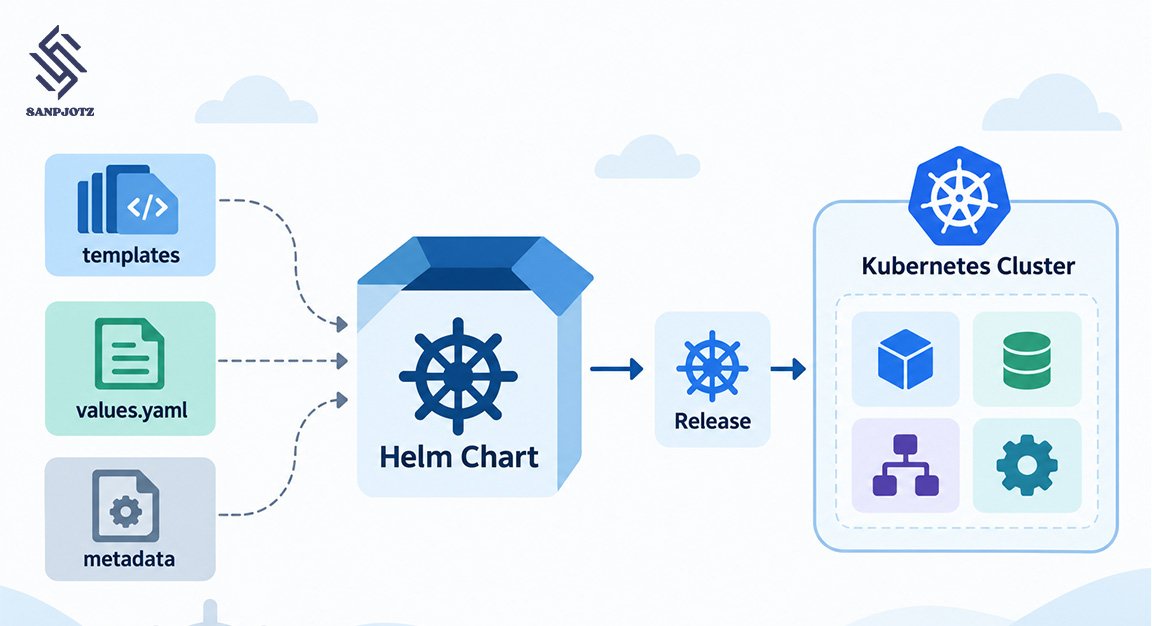
A Helm chart is a package containing the files needed to describe a Kubernetes application. It usually includes metadata, default values, templates, and sometimes dependencies.
A simple chart may look like this:
my-app/├── Chart.yaml├── values.yaml├── charts/└── templates/ ├── deployment.yaml ├── service.yaml └── ingress.yaml
Chart.yaml contains information such as the chart name, version, description, and application version. The templates folder contains Kubernetes YAML files with variables that Helm fills in before deployment.
It is also important to separate chart version from application version. A chart may be version 2.1.0 while the application itself is version 8.4. The chart version changes when the Kubernetes packaging changes, even if the application code stays the same.
Charts can also depend on other charts. For example, an application may include a PostgreSQL or Redis dependency. This can be useful, but large dependency trees can also make charts harder to understand.
How Helm Charts Work
Helm charts work by combining templates with configuration values. Helm processes both and produces normal Kubernetes manifests.
For example:
spec: replicas: {{ .Values.replicaCount }}
The chart may contain this default:
replicaCount: 2
Helm replaces the template value before sending the final YAML to Kubernetes.
A release called shop-api could therefore produce something like:
metadata: name: shop-apispec: replicas: 2
Kubernetes never sees the Helm template syntax. It only sees the rendered YAML.
This is why the following command is so useful:
helm template my-app ./my-chart
It lets you inspect the generated Kubernetes manifests without installing anything. In real projects, this often catches mistakes before they reach a cluster.
What Is values.yaml?
values.yaml contains the default settings used by a chart.
For example:
replicaCount: 2image: repository: nginx tag: "1.29"service: type: ClusterIP port: 80
These values can be replaced when the chart is installed or upgraded.
A team might keep separate configuration files such as:
values-dev.yamlvalues-staging.yamlvalues-prod.yaml
Production could then use:
helm upgrade --install shop ./chart -f values-prod.yaml
This is one of Helm’s biggest strengths because the same chart can be reused without copying all the Kubernetes manifests.
Still, more configuration is not always better. Some charts expose hundreds of values and become difficult to understand. Good chart design gives users control over important settings without turning every YAML field into a configurable option.
Sensitive information also needs care. Passwords and API keys should not be stored casually in a values file committed to Git. Helm can pass secrets, but it is not a full secret-management system.
What Is a Helm Release?
A chart is the package. A release is an installed copy of that chart.
For example:
helm install shop-dev ./shop-charthelm install shop-prod ./shop-chart
These commands create two separate releases from the same chart.
Each release can use different values and has its own history. Helm tracks changes when you upgrade the application.
You can view that history with:
helm history shop-prod
You can also restore an earlier revision:
helm rollback shop-prod 2
Rollback is useful, but it has limits. Helm can restore older Kubernetes configuration, but it cannot always reverse database migrations, external API changes, or application data changes. Production teams should not treat rollback as a complete recovery plan.
Common Helm Commands
Most daily Helm work uses a small number of commands.
| Command | Purpose |
| helm create | Create a new chart |
| helm install | Install a chart |
| helm upgrade | Update a release |
| helm rollback | Restore an older revision |
| helm uninstall | Remove a release |
| helm list | Show installed releases |
| helm history | View release history |
| helm template | Render YAML locally |
| helm lint | Check a chart |
| helm package | Package a chart |
A common deployment pattern is:
helm upgrade --install my-app ./my-chart
This is popular in CI/CD pipelines because it installs the release when it is missing and upgrades it when it already exists.
Before production deployment, helm lint and helm template are worth using. They help catch chart problems and allow teams to review the exact Kubernetes manifests being created.
Helm Repositories and OCI
Helm charts can be shared through repositories. Traditional Helm repositories usually contain packaged charts and an index.yaml file that lists available versions.
A repository may be added with:
helm repo add company https://example.com/chartshelm repo update
Modern Helm also supports OCI registries. OCI stands for Open Container Initiative. These registries are often already used to store container images, so using them for Helm charts can simplify authentication and package management.
A chart reference may look like:
oci://registry.example.com/platform/my-app
Artifact Hub is also commonly used to discover Helm charts. It is mainly a search and discovery service rather than one central storage server for every chart.
For new internal platforms, OCI is often worth considering because it fits well with existing container registry workflows.
Helm vs kubectl
Helm and kubectl are often compared, but they solve different problems.
kubectl works directly with Kubernetes resources:
kubectl apply -f deployment.yaml
Helm works with packaged applications:
helm install shop ./shop-chart
kubectl is better for inspecting Pods, viewing logs, applying simple manifests, and troubleshooting individual resources. Helm is better when several related resources need to be installed, upgraded, and versioned together.
Not every Kubernetes project needs Helm. If a small service has only two stable YAML files, plain manifests may be easier. Helm becomes more useful when teams start copying configuration between environments or managing many similar deployments.
A good rule is simple: use Helm when it removes real repetition, not just because it is a popular Kubernetes tool.
Helm Benefits and Risks
Helm makes Kubernetes deployments more repeatable. Teams can use one tested chart across several environments while changing only the values that matter.
It also improves versioning and release management. Instead of sharing a folder full of YAML files, teams can distribute a specific chart version with known defaults and dependencies.
The biggest risk is complexity. Too much template logic can hide what Kubernetes is actually doing. A chart full of conditions, helpers, and hundreds of configuration values may be technically flexible but difficult to troubleshoot.
Security also matters. A public chart can create ServiceAccounts, RBAC rules, Jobs, volumes, and other resources. Before using a third-party chart in production, review its templates, container images, permissions, dependencies, and security settings.
Rendering the chart locally with helm template is one of the easiest ways to see what it plans to create.
Helm 4 in 2026
Helm 4 is now the current major version of Helm. Helm 4.0.0 was released in November 2025, making it the first major release after Helm 3.
The core chart model remains familiar, so most existing Helm 3 charts do not need a complete rewrite. This is important for teams with large chart libraries.
Helm 4 introduces changes such as improved Server-Side Apply support, updates to the plugin architecture, better resource handling, and other internal improvements.
For teams still using Helm 3, migration should now be part of normal maintenance planning. Helm 3 has entered its final support period, so new projects should generally start with Helm 4 unless there is a specific compatibility reason not to.
The practical advice is not to redesign everything. Test existing charts, review CI/CD scripts, check plugins, and verify deployment behavior in a non-production cluster before switching.
FAQs
What is Helm used for in Kubernetes?
Helm is used to package, install, configure, upgrade, and manage Kubernetes applications.
What is the difference between Helm and a Helm chart?
Helm is the tool, while a Helm chart is the package containing templates, values, and metadata.
Can Kubernetes work without Helm?
Yes. Helm is optional. Kubernetes applications can also be deployed with plain YAML and kubectl.
Is Helm 4 better for new projects in 2026?
Yes. New projects should generally use Helm 4 because it is the current major version and Helm 3 is moving toward end of support.






One Comment