
ICS File Format: Uses, Benefits and Examples
An ICS File is a calendar document used to share event and scheduling details between different apps. It can hold a meeting title, date, time, location, description, reminder, organizer, and repeat rules. The format follows the iCalendar standard, so it works across services such as Google Calendar, Microsoft Outlook, and Apple Calendar.
What Is an ICS File and How Does It Work?
Many users ask, what is an ics file? In simple terms, it is a text-based calendar document that normally ends with the .ics extension. It follows the iCalendar standard published by the Internet Engineering Task Force (IETF). Calendar apps read the structured lines inside the document and turn them into normal events.
The file can be sent by email, downloaded from a website, or offered through an Add to Calendar button. When you open it, a supported calendar app reads the event data. You can then save the event without typing the date, time, location, and other details by hand.
What Information Can the Format Store?
The format stores more than an event name. Common fields include SUMMARY for the title, DTSTART for the start time, DTEND for the end time, LOCATION for the place, and DESCRIPTION for extra notes. It can also include an organizer, attendees, reminders, links, time zones, and a unique event ID.
It can support repeating events through a rule called RRULE. A class can repeat every Monday, while a birthday can return every year. The standard can also represent tasks, journal entries, and free or busy information, which makes it flexible.
Common Uses of Calendar Files in Daily Life
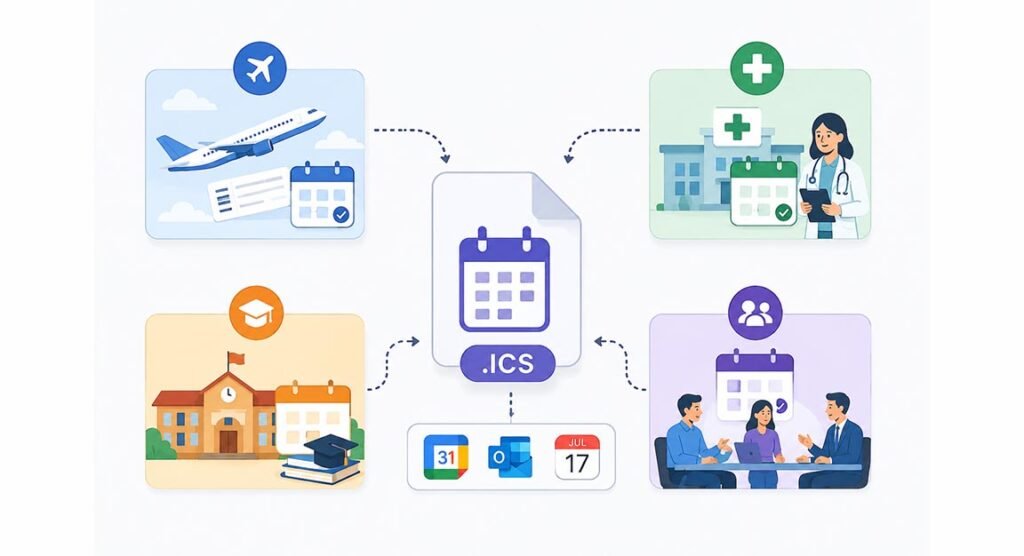
An ICS File is often used after someone books or registers for something. Airlines may provide calendar details for flights, clinics may send appointment events, schools may share class schedules, and companies may send meeting information.
Businesses like this system because one calendar document can work with many services. A customer does not need to use the same app as the company.
How to Open and Import Calendar Data
Most modern calendar services support the format. In Google Calendar, users can open Settings, choose Import & Export, select the file, and choose the calendar where the events should be added. Microsoft Outlook also supports iCalendar imports, while compatible Apple calendar apps can open calendar invitations and event information.
There is an important difference between importing and subscribing. Importing normally adds a fixed copy of the event data. If the original schedule later changes, your imported copy may not update. A subscription works differently because the calendar service can check an online feed and receive later changes.
Practical Examples for Events and Meetings
A simple meeting document may contain a title, start time, end time, office location, and short description. A webinar entry may include a website link, speaker name, start time, and reminder. A sports calendar can include many events in one document, with each match stored inside its own VEVENT section.
Another example is a recurring weekly class. Instead of creating many separate appointments, the calendar can use one event with an RRULE that tells the app when it repeats.
Benefits of Using This Calendar Format
The biggest benefit is compatibility. The format is based on an open Internet standard, so it is not limited to one company. It can move scheduling information between different calendar apps, devices, and operating systems.
Another benefit is speed. People can add complete event details with only a few clicks. The format supports recurring dates, reminders, time zones, attendees, organizers, and descriptions.
Calendar Format vs CSV and VCS
A CSV file stores information in rows and columns, so it is useful for simple data. However, CSV was not designed mainly for calendars. It may not handle advanced features such as repeating events, reminders, attendees, and time zones as clearly as iCalendar data.
The older VCS extension is linked to the vCalendar format. It may still appear in older software, but .ics is the more common modern option.
Common Problems and How to Fix Them
If an ICS File fails to import, the cause may be broken formatting, missing lines, wrong date values, or unsupported properties. Time-zone mistakes can also make an event appear at the wrong hour. Duplicate events may appear when the same calendar data is imported more than once.
Try opening the document with another trusted calendar app. Check that its name ends in .ics and that the dates look correct. For manually created files, make sure calendar and event sections are properly opened and closed. Exporting events through a calendar app is usually safer than editing the code by hand.
Is the Format Safe to Download and Use?
The format mainly contains calendar data, but users should still be careful with unknown sources. Event descriptions can contain links, locations, organizer details, and other text. A suspicious calendar can also add unwanted or misleading events if someone imports it without checking.
Download calendar documents only from websites, companies, or people you trust. Review event details before adding them, and be careful with unusual links.
FAQs
What is this format mainly used for?
It is used to share calendar events, meetings, appointments, schedules, and reminders between compatible calendar applications.
Can Google Calendar open this type of file?
Yes. Google Calendar allows users to import .ics documents through its Import & Export settings on a computer.
Can one calendar document contain many events?
Yes. One document can contain several VEVENT sections, so it can hold a full schedule instead of only one event.
Does an imported event update automatically?
Usually not. A normal import is a fixed copy. For later changes, users normally need to subscribe to an online calendar feed.
Can I create this type of file myself?
Yes. The format is text based, so it can be created manually. However, using a calendar app or trusted generator is easier and reduces formatting errors.