How to Delete Google Reviews for Your Business
Google reviews can influence how people see a company before they buy anything. Positive feedback builds trust, while fake or harmful reviews may damage a business reputation. Many owners therefore ask how to delete Google Reviews when a review looks false, abusive, or unfair. However, business owners cannot directly delete reviews written by customers. Google only removes reviews that break its content policies, so it is important to understand the correct reporting process.
Can You Delete Google Reviews From Your Business Profile?
A business owner does not get a normal “delete” button for customer reviews. The reviewer controls their own review, while the business can only report it. Google also explains that a review should not be reported simply because it is negative or because the business disagrees with the customer. Genuine criticism may stay online when it follows Google’s rules.
Understanding How to Delete Google Reviews therefore starts with checking whether the content actually violates a Google policy. Reviews involving spam, inappropriate content, fake activity, or other prohibited material may qualify for removal. A normal one-star review describing a real customer experience may not.
How to Report a Google Review for Removal
The basic reporting process is simple. Sign in to the Google Account connected with your Business Profile. Open your Business Profile, choose Read reviews, and find the review you want Google to check. Select the report icon next to it, choose the reason that best describes the problem, such as Spam or Profanity, and send the report.
Google says review evaluation normally takes several days. Reporting does not guarantee removal because Google checks whether the review breaks its policies before taking action.
Which Google Reviews Can Be Removed?
When learning How to Delete Google Reviews, you should know what types of reviews have a stronger reason for removal. These may include fake engagement, spam, offensive language, harassment, inappropriate content, privacy problems, advertising, or reviews that clearly do not relate to a real experience with the business.
Google’s system focuses on policy violations rather than whether a review is positive or negative. This protects both customers and companies because real customer opinions can remain visible while harmful or misleading content may be removed.
How to Remove Fake, Spam, or Competitor Reviews
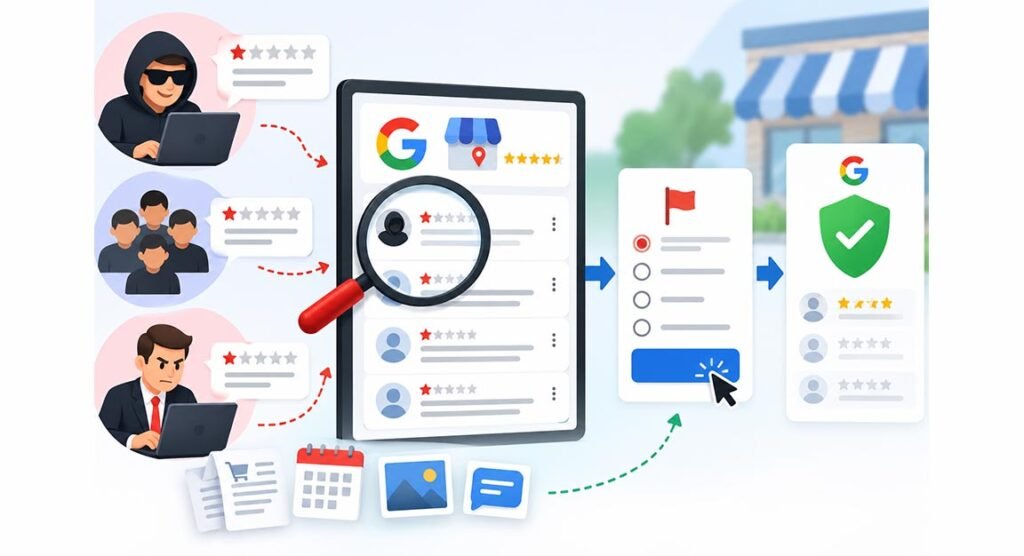
Fake reviews can be especially damaging. A reviewer may never have visited the business, or someone may use several accounts to influence ratings. Competitor reviews may also create problems when they are posted to hurt another company’s reputation instead of describing a real customer experience.
If you believe a review is fake, report it using the most suitable reason. Do not depend only on the fact that you cannot find the person’s name in your customer records. A customer might use a different Google name. Keep useful information such as order records, dates, screenshots, and messages in case you need them later.
How to Use the Google Reviews Management Tool
The Reviews Management Tool is one of the most useful options for business owners How to Delete Google Reviews. It allows you to report reviews and check what happened after Google examined them.
After signing in, choose your business and select the option to report a new review. You can later see statuses such as Decision pending, Report reviewed – no policy violation, or Escalated – check your email for updates. These messages help you understand whether Google is still checking the review or has already made a decision.
What to Do If Google Rejects Your Review Removal Request
Google may decide that a reported review does not violate its policies. In this situation, an eligible review can receive a one-time appeal. Open the Reviews Management Tool, choose the option to check previously reported reviews, and select Appeal eligible reviews. Google currently allows businesses to select up to 10 reviews during the appeal process.
Complete the appeal form carefully. If Google decides that the review violates policy, it will be removed. If it follows policy, it will remain visible. Google sends the final result by email.
How to Delete a Google Review You Posted Yourself
The process is different when you wrote the review yourself. A Google user can normally edit or delete their own review. This is important because many ” How to Delete Google Reviews come from people who want to remove feedback they personally posted, rather than business owners removing customer feedback.
The reviewer can open Google Maps, find their contributions or reviews, locate the review, open its menu, and choose the available delete option. A business cannot perform this action for another user’s account.
Can You Ask a Customer to Delete or Edit a Review?
A business can contact a customer and try to solve the problem behind a negative review. For example, if an order arrived late, the company can apologize, investigate the issue, and offer normal customer support. If the customer becomes satisfied, they may choose to update or remove their review themselves.
Avoid putting pressure on a customer simply to improve your rating. The safest approach is to solve the real problem first and allow the reviewer to decide what they want to do with their feedback.
How to Respond When a Negative Review Cannot Be Removed
Not every negative review will disappear. If Google decides that a review describes a genuine experience and follows its rules, a professional public response is often the best option. Thank the customer for sharing feedback, acknowledge their concern, and offer a clear way to contact the company.
Do not argue, insult the reviewer, or publish private customer information. A calm response shows future customers that your business takes complaints seriously. In many cases, a professional reply can reduce the damage caused by a negative review even when removal is impossible.
How to Protect Your Business From Harmful Google Reviews
Knowing How to Delete Google Reviews is useful, but prevention and reputation management are also important. Check your Business Profile regularly so you can notice suspicious reviews early. Keep customer records and screenshots when there is clear evidence of spam, threats, or fake activity.
You should also encourage real customers to leave honest feedback after genuine experiences. A steady collection of natural reviews can make one negative rating less important. Avoid fake reviews, mass reporting, or services that promise guaranteed removal. Google uses automated systems to detect spam, and suspicious activity may create additional problems.
The safest method is to follow Google’s process: identify a real policy violation, report the review, check its status, and use the appeal option when available. Learning How to Delete Google Reviews correctly helps businesses protect their reputation without breaking Google’s rules.
FAQs
Can a business directly delete a Google review?
No. A business cannot directly delete a review written by another user. It can report the review if it appears to break Google’s policies.
How long does Google take to check a reported review?
Google says review evaluation usually takes several days, although the exact time can vary depending on the case.
Can Google remove a fake one-star review?
Yes, Google may remove it if the review violates its policies. A low rating alone is not enough reason for removal.
What happens if Google rejects my report?
You may be able to submit a one-time appeal for an eligible review through the Reviews Management Tool.
Should I reply to a review that cannot be removed?
Yes. A short, polite, and helpful response can show future customers that your business takes feedback and customer service seriously.