Risk Management Software for Better Risk Control
Risk Management Software helps a business find, study, record, and control risks in one organised system. It can replace scattered spreadsheets, emails, and manual reports with a clear process. Teams can see who owns each risk, how serious it is, what controls are in place, and what action is still needed. This gives managers better information before they make important decisions.
What Is Risk Software and How Does It Work?
Risk Management Software is a digital platform used to manage risks across a company. It often stores risks in a central risk register. Each record can include the risk description, owner, department, cause, possible impact, current controls, review date, and action plan. This gives teams one place to manage important risk information.
The process starts by identifying a risk. The team studies its likelihood and impact, gives it a score, assigns an owner, and chooses a response. The system can send reminders and track actions. ISO 31000 follows similar steps, including identifying, analysing, evaluating, treating, monitoring, and communicating risk.
Key Features That Support Better Risk Control
A useful system may include a risk register, scoring tools, dashboards, alerts, reports, control tracking, action plans, audit trails, and document storage. Some platforms also support incident management, compliance work, and third-party risk. These features help managers understand individual risks and the wider risk picture.
Workflow tools can also save time. A high-risk item may be sent to a manager for review, while a control owner can receive a task when evidence is due. Dashboards can show overdue actions, rising risks, weak controls, or risks above the company’s accepted level. This helps teams act before problems become larger.
How Businesses Identify and Record Risks
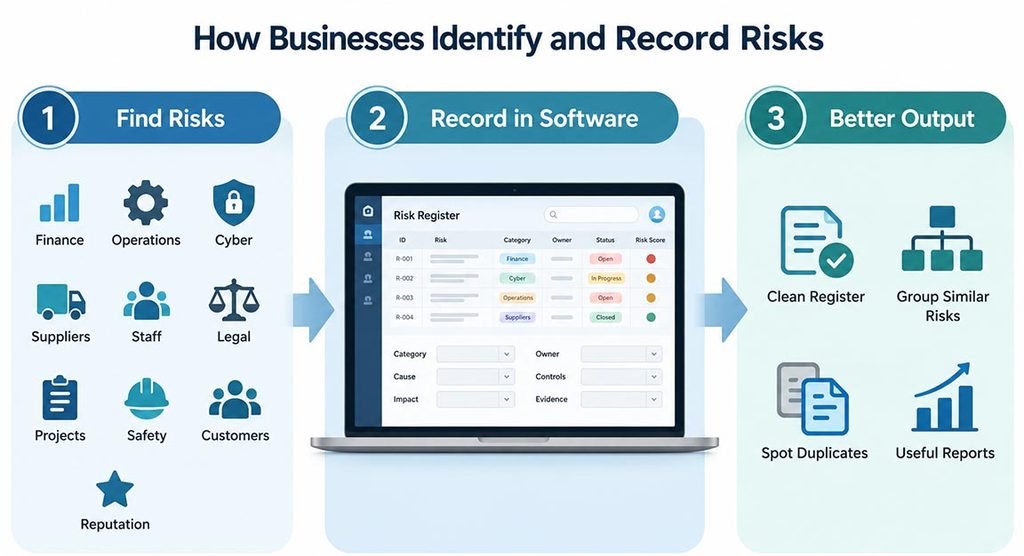
Risk identification means finding events or conditions that may stop a business from reaching its goals. Risks can come from finance, operations, cyber security, suppliers, staff, laws, projects, safety, customers, or reputation. Teams may find them through workshops, audits, incidents, complaints, data analysis, control testing, and staff discussions.
Risk Management Software makes this work more consistent because every risk can follow the same format. Teams can add categories, causes, effects, owners, controls, and evidence. Similar risks can be grouped, while duplicate records are easier to notice. This creates a cleaner risk register and more useful reports.
Risk Scoring and Prioritisation Methods
A common method is to score risk by combining likelihood and impact. Both may be rated from 1 to 5. For example, likelihood 4 and impact 5 can create a score of 20. Businesses may then classify risks as low, medium, high, or critical. The scoring method should fit the company’s size and needs.
Teams should also separate inherent risk from residual risk. Inherent risk is the level before controls are considered. Residual risk is what remains after controls are applied. The difference helps managers judge whether controls are working and whether they should accept, reduce, transfer, or avoid the remaining risk.
Using Dashboards, Alerts, and Reports
Dashboards turn risk data into a simple view. They can show top risks, overdue actions, trends, failed controls, incidents, and risks by department. A heat map can display risks by likelihood and impact. This allows managers to focus attention on the areas that need action first.
Alerts may appear when a review date is close, a control test fails, or a risk score rises. Reports can support managers, boards, auditors, and regulators. NIST also treats continuous monitoring as an important part of risk management because organisations need current information about controls and changing risk conditions.
How It Supports Compliance and Audits
Risk Management Software can connect risks with policies, controls, laws, standards, evidence, and audit findings. Staff can store documents, test controls, assign corrective actions, and keep records of approvals. This creates a clearer link between a rule, the control used to meet it, and the evidence showing what the business has done.
An audit trail shows who changed a record, when it changed, and what action followed. This improves accountability and can make audit preparation easier. However, software does not create compliance by itself. A company still needs suitable policies, trained staff, effective controls, accurate evidence, and regular management reviews.
Managing Different Types of Business Risk
One platform can cover many risk areas. Operational risks may include process or equipment failure. Financial risks can involve cash flow, credit, or market changes. IT risks may include cyber attacks, system failure, data loss, and weak access controls. Supplier risks can include delays, poor service, financial weakness, or security problems.
Risk Management Software can also support third-party risk by keeping supplier assessments, contracts, issues, review dates, and action plans together. Companies can compare suppliers using the same scoring method. This matters because a supplier or service provider can create serious risk even when a company’s internal controls are strong.
Why Software Can Be Better Than Spreadsheets
Spreadsheets are familiar, but they become harder to control as a risk program grows. Different teams may use different versions, formulas, names, or scoring rules. Files can become out of date, and manual reminders take time. It can also be difficult to see a full history of changes.
A central system creates one source of risk information. Permissions can control who views or edits records, while automatic reminders improve follow-up. Standard forms can make data more consistent. Software can also connect risks, controls, incidents, and actions, giving managers a clearer view than separate files usually provide.
How to Choose the Right System
Start with the business problem, not the longest feature list. Define the risks you need to manage, the number of users, reporting needs, approval steps, and standards you follow. Check whether the platform supports your scoring method, risk appetite, control testing, dashboards, evidence, integrations, and user permissions.
Test the system with real work before buying it. Ask users to create a risk, update a control, complete an approval, and run a report. Also review security, data location, backup, access control, support, training, cost, and integration options. The product should fit the business without making the process harder.
Best Practices for Successful Implementation
Give each major risk a risk owner and each important control a clear owner. Set review dates and explain what information users must enter. Avoid adding too many fields at the start. A simple process that people use correctly is more valuable than a complex system that staff avoid.
Risk Management Software works best when information is reviewed often. Old scores, missing actions, and weak controls should not stay hidden. Managers should use risk reports in real meetings and decisions. ISO 31000 also supports monitoring, review, continual improvement, and the integration of risk management into governance and planning.
FAQs
What is the main purpose of risk software?
It helps a business identify, assess, monitor, and respond to risks in a clear and organised way.
Can small businesses use risk software?
Yes. A small business can use a simple platform to manage key risks, controls, actions, and review dates.
What is a risk register?
It is a central list of known risks, including owners, scores, controls, actions, and review details.
Does risk software remove business risk?
No. It supports better decisions and control, but people still need to review information and take action.
What should I check before choosing a platform?
Check ease of use, scoring, reports, security, permissions, integrations, support, cost, and fit with your process.