How to Type Small Text on Discord Mobile and Desktop
To type small text on Discord, start a new line with -# and then write your message. For example:
-# meeting moved to 5 PM
Discord renders the whole line in a smaller, muted style called subtext. The space after the # is required, and the format must appear at the beginning of the line.
This works in regular Discord messages on mobile, desktop, and the web version. You do not need a bot, special font generator, browser extension, or paid account. It is a built-in Discord formatting feature.
How to Make Small Text on Discord with the -# Format
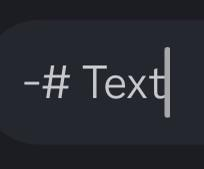
The correct format is:
-# Your small text goes here
Three details matter. The hyphen must come first, the # must follow it immediately, and there must be a space before your message.
This works:
-# This line will appear smaller.
These examples usually do not work:
-#This has no space.Hello -# this starts in the middle.
Discord subtext is line-based, which means it applies to the full line rather than a single word. It is most useful for notes, reminders, edits, disclaimers, timestamps, or supporting details beneath a main message.
For example:
Server maintenance begins tonight.-# Expected downtime: around 20 minutes.
This creates a clear visual hierarchy. The main message receives attention first, while the smaller line provides extra context.
How to Type Small Text on the Discord Mobile App
Open the Discord app on iPhone or Android and enter a server channel or direct message. Tap the message box, type -#, add a space, and then write your message.
For example:
-# I will join after dinner.
Tap send, and Discord should display the line as subtext.
You may need to open the symbols section of your phone keyboard to find the hyphen and number sign. Depending on the keyboard, this is usually done by tapping 123, ?123, or a similar button.
Some users assume small text is unavailable on mobile because Discord does not always show a dedicated formatting button for it. The feature is entered manually through the message field, so the lack of a visible button does not mean it is unsupported.
Mobile keyboards can also cause formatting problems. Predictive text may remove the space, insert a longer dash, or add an invisible space before the marker. If the format does not work, delete the line and type it again manually.
How to Type Small Text on Discord Desktop and Web
On Discord desktop or the web version, click the message box and type -# at the beginning of the line. Add your message and press Enter.
Project files have been uploaded.-# Check the shared folder before tomorrow’s call.
If you want normal text and small text in the same message, create a new line before adding the subtext. On desktop, use Shift+Enter to insert a line break without sending the message.
Each small-text line needs its own marker:
Event registration is open.-# Registration closes Friday.-# Late entries may not be accepted.
The formatting does not automatically continue onto the next line. This is a common source of confusion when writing longer announcements.
How to Add Small Text Below a Normal Discord Message
The most practical way to use Discord subtext is beneath a normal message. Write the main point first, add a line break, and then begin the supporting line with -# .
Movie night starts at 8 PM.-# Voting for the film closes at 7:30 PM.
This format works well for server announcements, event details, moderation notes, edit history, or low-priority reminders. Gaming communities may use it for lobby information, while work servers may use it for deadlines or timezone notes.
Small text should not contain information that readers must notice. Because it appears less prominent, users may overlook it while scanning a busy channel. Important rules, safety instructions, deadlines, and required actions should remain in normal text.
It is also better to avoid long paragraphs in subtext. A small line can look clean on desktop but wrap into several lines on a phone. Once that happens, it becomes harder to read and may occupy more space than the main message.
Discord Small Text Examples You Can Copy and Paste
Here are a few useful examples:
Team meeting begins at 10 AM.-# Join five minutes early for the audio check.
The tournament date has changed.-# Edited: the new date is Saturday.
This channel is temporarily locked.-# Posting will reopen after the event ends.
The livestream starts at 6 PM UTC.-# That is 11 PM in Pakistan Standard Time.
Subtext is most effective when used occasionally. If every line in a message is small, the visual hierarchy disappears and the content becomes more difficult to scan.
Why Small Text Is Not Working on Discord
The most common problem is a missing space after the #.
Incorrect:
-#message
Correct:
-# message
The marker must also begin the line. This will not normally create subtext:
Update: -# the meeting was delayed
Use a separate line instead:
Update:-# The meeting was delayed.
Another issue is leading indentation. If spaces appear before -#, Discord may interpret the line differently. This often happens when text is copied from a document or notes app.
Your keyboard may also replace the ordinary hyphen – with a longer dash such as – or —. These symbols look similar, but they are not the same character.
The easiest troubleshooting method is to send this exact message in a normal server channel or direct message:
-# test
If it works, the original message probably contained incorrect spacing, indentation, copied formatting, or the wrong dash.
Can You Make Only One Word Smaller in Discord?
Discord’s built-in subtext format cannot shrink only one word inside a normal sentence. The -# marker applies to the entire line.
This does not create inline small text:
I said -# quietly that we should leave.
A native workaround is to move the smaller phrase onto its own line:
I said that we should leave.-# quietly
Some people use tiny Unicode characters to imitate smaller words, such as superscript letters. That can work for decoration, but it is not the same as Discord subtext.
Unicode text may be harder to search, copy, or read with screen readers. Some letters also have no clean tiny equivalent. For jokes, usernames, or decorative text, that may be acceptable, but normal Discord formatting is usually better for instructions and important information.
How to Combine Small Text with Other Discord Formatting
You can often place bold, italics, spoilers, links, or inline code after the subtext marker.
-# **Important small note**-# *Italic side comment*-# ||Hidden hint||-# Run `/verify` after joining.
A masked link can also appear inside subtext:
-# [Read the full rules](https://example.com)
Use combined formatting carefully. Bold text says “pay attention,” while subtext says “this is secondary.” Combining too many styles can make a message feel visually confused.
Backticks are also sometimes described as a way to make small text, but that is inaccurate. Backticks create inline code formatting, which changes the font and background. They do not create Discord’s actual subtext style.
Also Read: Slidebean AI Pitch Deck Tool
Discord Small Text vs. Tiny Unicode Text and Font Size Settings
Discord subtext changes the appearance of one message line. Tiny Unicode text replaces normal letters with special characters. Discord’s font-size settings, on the other hand, change how the interface looks only for the person adjusting them.
These features solve different problems. Use -# when you want to add a secondary note beneath a message. Use Unicode only for deliberate decoration. Change Discord’s appearance settings when chat text is too large or too small on your own screen.
Subtext does not let you choose an exact font size, reduce the Discord message limit, or permanently change a server’s font. It is simply a built-in way to make one line look less prominent.
FAQs
What is the symbol for small text on Discord?
Use -# at the beginning of a new line. Include the space after the #.
Does Discord small text work on mobile?
Yes. The same format works on both iPhone and Android in regular Discord messages.
Can I use small text in Discord direct messages?
Yes. Subtext works in normal direct messages as well as server channels.
Why is Discord showing -# instead of small text?
The line may be missing the required space, placed in the middle of a sentence, indented, or typed with the wrong kind of dash.