
Tech Ideas That Made the Web Move Quicker and Work More Efficiently
The internet did not become fast because of one invention. It improved through changes in browsers, servers, networks, images, and code. The Tech Ideas That Made the Web Move Quicker helped pages open sooner, reduced wasted data, and made online tools easier to use. They also helped people on slow mobile networks, older devices, and limited data plans enjoy a smoother web experience.
How Faster Internet Protocols Reduced Loading Delays
A browser and a server communicate through HTTP, or Hypertext Transfer Protocol. Early websites used HTTP/1.1, which often handled files in a slower order. A page with many images, scripts, and style files could take longer because some requests had to wait.
HTTP/2 introduced multiplexing, allowing many files to move through one connection at the same time. Later, HTTP/3 used QUIC, a system built to create connections faster and handle weak or changing networks better. These protocols are important Tech Ideas That Made the Web Move Quicker because they reduce waiting between the browser and server.
How Browser Caching Helped Websites Reuse Files
Browser caching lets a device save website files for later use. When a person returns, the browser may reuse logos, fonts, CSS, and JavaScript instead of downloading them again. This saves data and makes repeat visits faster.
Developers manage caching with instructions such as Cache-Control. They can tell the browser how long a file should stay stored. Many sites also add version codes to file names. When a file changes, its name changes, so the browser downloads the new copy.
Why Content Delivery Networks Brought Data Closer
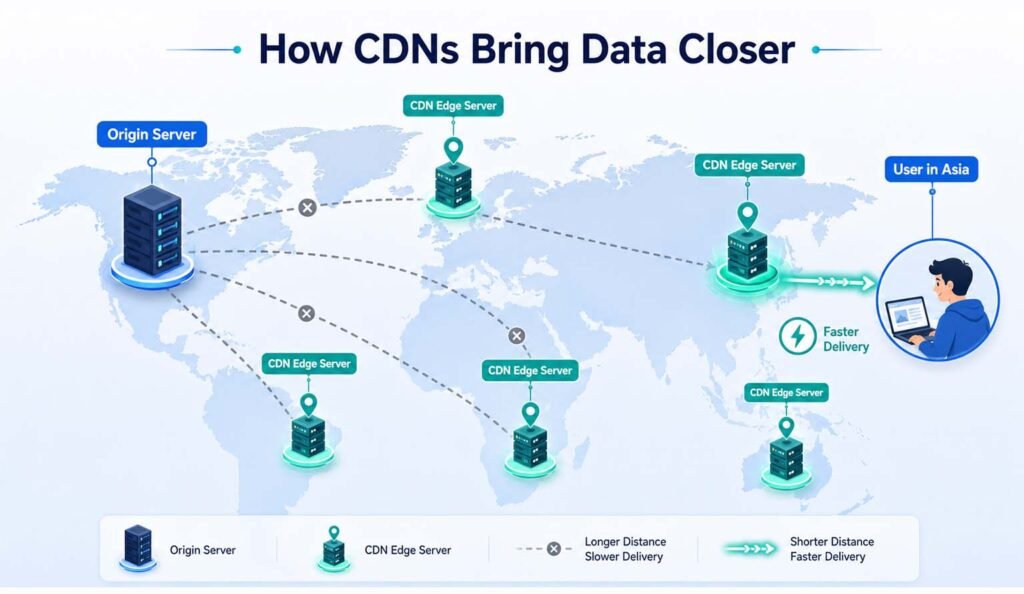
A Content Delivery Network, or CDN, is a group of servers in different regions. It stores copies of website content and sends them from a location close to the visitor. This reduces the distance that data must travel.
A user in Asia may receive images from a nearby CDN server instead of a main server in North America. CDNs also share heavy traffic across many machines. This makes them practical Tech Ideas That Made the Web Move Quicker for global stores, video platforms, and news websites.
How Compression Reduced File Size and Bandwidth
Compression makes files smaller before they travel across the internet. The browser receives the compressed file and opens it automatically. Gzip and Brotli are common methods for HTML, CSS, JavaScript, and other text files.
A smaller file needs less time and bandwidth to download. A 500 KB script, for example, may become far smaller after compression. This is helpful for mobile users. Compression keeps the same information but sends it in a more efficient package.
How Image Optimization Made Pages Lighter
Images are often the largest parts of a page. A site may look simple but still load slowly because it sends oversized photos. Developers fix this by resizing images, reducing extra quality, and using modern formats such as WebP and AVIF.
Responsive images also help. A phone should not download the same large picture used on a desktop screen. Features such as srcset and the picture element let the browser choose a suitable size. These Tech Ideas That Made the Web Move Quicker reduce page weight without removing useful visuals.
Why Lazy Loading Improved Long Web Pages
Lazy loading delays content that is not yet needed. On a long article, the browser loads images near the top first and waits to load lower images until the user scrolls closer. Hidden content no longer competes with the main content during the first seconds.
Modern HTML supports loading=“lazy” for many images and frames. However, developers should not lazy-load the main image at the top. That image is often part of Largest Contentful Paint, an important speed measure, so it should usually load early.
How Minification and Code Splitting Reduced Waste
Developers write code with spaces, comments, and clear names so people can read it. Browsers do not need these extra characters. Minification removes unnecessary parts from HTML, CSS, and JavaScript while keeping the result unchanged.
Code splitting solves another problem. Instead of sending one huge JavaScript file, a site sends smaller files when needed. A visitor on a product page does not need payment code at once. Together, these are Tech Ideas That Made the Web Move Quicker because they reduce the code a browser must download and process.
How Async and Defer Prevented Script Blocking
JavaScript can stop a browser from showing content while a script downloads and runs. The async and defer attributes let the browser continue reading HTML during the download.
An async script runs when ready, so it suits independent tools such as analytics. A deferred script waits until the page structure is ready, making it useful for menus, buttons, and forms. Correct script timing helps visible content appear sooner and keeps the page responsive.
How Servers and Databases Improved Response Speed
A fast page also needs a fast server. Before sending content, a server may check an account, read a database, calculate a price, or contact another service. Slow and repeated calculations can delay the page.
Developers improve this work with database indexes, memory caching, load balancing, and better queries. Server-side rendering can also send ready-made HTML instead of making the browser build everything with JavaScript. These methods reduce response time during both normal and busy periods.
How Developers Measure and Protect Web Speed
Developers use Core Web Vitals to study real user experience. Largest Contentful Paint checks how quickly the main content appears. Interaction to Next Paint measures how fast a page responds to a click or tap. Cumulative Layout Shift tracks unexpected movement.
A performance budget can limit image size, JavaScript size, page weight, and third-party scripts. Regular testing matters because sites often slow down when new tools are added. Good performance work depends on measuring results and fixing new problems early.
Why These Improvements Still Matter
Fast websites are easier to use on weak networks and low-cost devices. They use less mobile data, lower server costs, and help visitors finish tasks without long waits. Speed also supports wider access because users do not need powerful hardware.
The main lesson is simple: deliver the correct content, in the smallest useful form, from the closest suitable server, at the right time. The Tech Ideas That Made the Web Move Quicker did more than increase speed. They made the internet more reliable, efficient, and available to more people.
FAQs
What made modern websites load faster?
Modern sites became faster through HTTP/2, HTTP/3, caching, CDNs, compression, optimized images, and improved code delivery.
What is the role of a CDN?
A CDN stores content on servers near users, reducing distance, loading time, and pressure on the main server.
Does lazy loading improve every image?
No. It works best for images below the visible area. Main images near the top should usually load early.
Why is JavaScript often a speed problem?
Large scripts take time to download, process, and run. Code splitting, async, and defer reduce this delay.
How can developers check website speed?
They can use Core Web Vitals, browser tools, real-user data, and performance budgets to find and fix problems.